Trim
Trim removes the part of a sketch edge you click: the stretch between the nearest crossings on either side of the click. It is how a circle drawn across an outline becomes a notch, or a line drawn past a corner is cut back to it. To cut an edge in two without removing anything, use Split.
In the viewport
- Click Trim on the sketch toolbar (shortcut tr). It sits in the group with Fillet, Offset and Split. There is no dialog: the tool arms and waits for a click.
- Hover an edge: the part the click would remove is drawn in the red removal colour, and the rest of the edge keeps its own colour. The red part follows the cursor from crossing to crossing, so moving along the edge shows each stretch in turn.
- Click, and that part goes.
- The tool stays armed, so click the next edge for the next trim. Esc leaves the tool.
A crossing is where another sketch entity crosses or touches the edge: lines, arcs, circles, ellipses, bezier curves, guides, projected references and copy or mirror images all count, and so does a tangency. The sketch's own origin axes do not, and neither does a corner where the edge's own end meets another edge. If nothing crosses on one side of the click, the part runs to that end of the edge. If nothing crosses at all, the whole edge is deleted. On a circle, the part is the arc between the crossing before and the crossing after the click; a circle with fewer than two crossings is deleted whole.
The tool does not write a trim() call. It rewrites the source: the entity's statement is rewritten in place, and argument expressions the trim did not touch stay verbatim, so line([0, 0], [w, h]) trimmed at its end becomes line([0, 0], [10, 0]). When the middle of an edge goes, the statement keeps the first piece under its old variable name, so every .start() and .center() reference to it stays valid, and a new const for the last piece is inserted right after it, under the next free name.
The coordinates in a sketch statement are guesses; the constraints decide where the geometry ends up. So before it cuts, the tool writes the solved position of every entity in the sketch into its literals, the way finishing a drag does, and cuts that. The cut points and the untouched coordinates then describe one sketch that is already solved, and nothing moves after the trim.
The trim is a plain edit. Undo reverts it, and what survives is drawn geometry like any other: drag it, dimension it, fillet it or delete it.
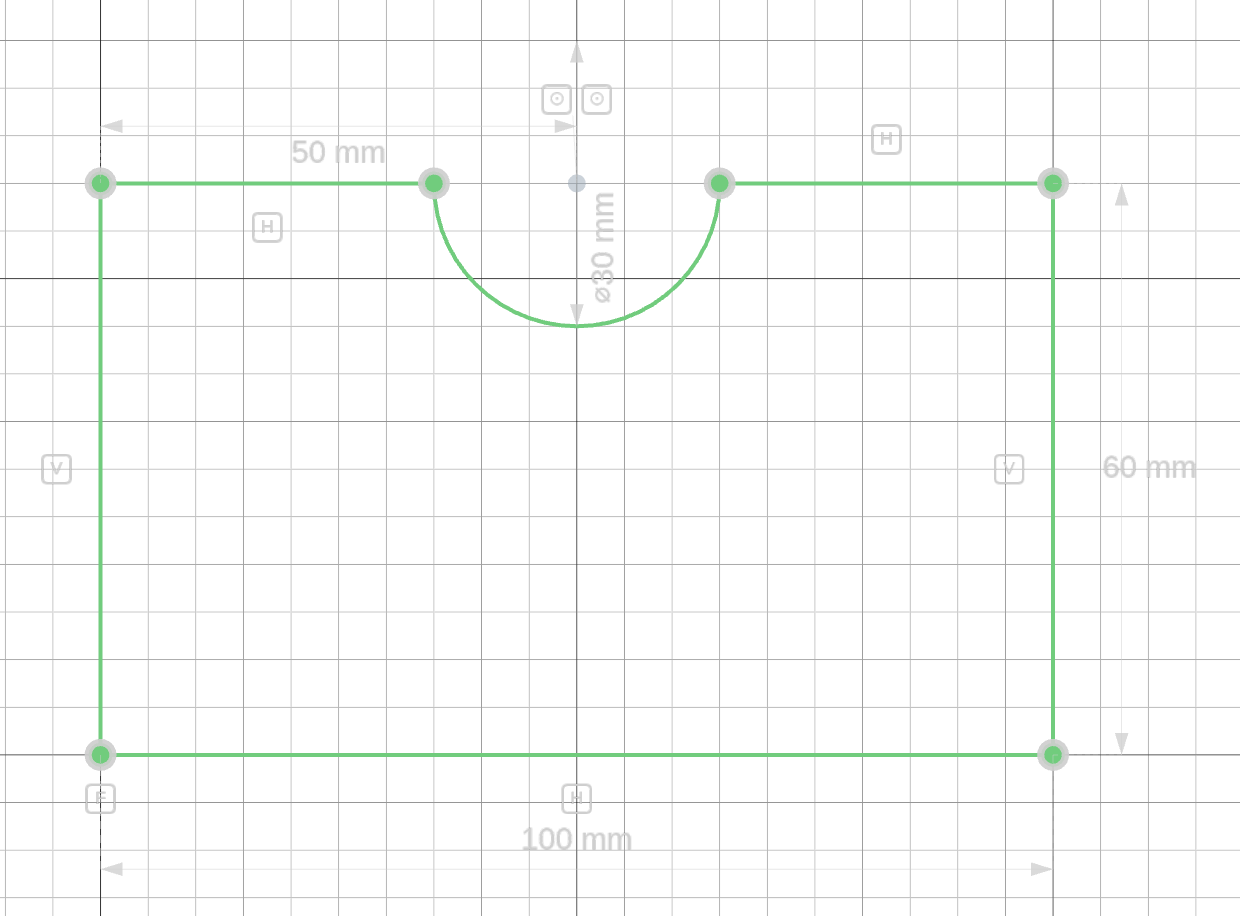
The code behind it
Only the constraints the tool had to touch changed: the corner coincident moved its .end() to the second piece, horizontal was copied onto it, the circle's diameter and centre distance stayed on the arc, the centre-on-edge coincident was deleted because the centre sat on the removed stretch, and the new ends were pinned to what cut them. The last two constraints are not the tool's: the deleted centre-on-edge coincident left the notch's height free, so the centre is put back on the edge by hand.
import { sketch, line, arc } from 'fluidcad/core';
import { coincident, horizontal, vertical, fix, distance, diameter } from 'fluidcad/constraints';

// A mounting plate, 100 × 60, with a semicircular cable notch in its top
// edge. The notch was drawn as a circle sitting on the top edge, then the
// Trim tool removed the stretch of the top edge inside the circle and the
// half of the circle outside the plate. This is the code the tool left
// behind.
sketch("xy", () => {
    const bottom = line([0, 0], [100, 0]);
    const right = line([100, 0], [100, 60]);
    // Before the trim this was one statement: line([100, 60], [0, 60]).
    // The removed stretch ran between the two crossings with the circle,
    // so two pieces survive: the first keeps the old name, the last is
    // inserted right after it under the next free line name. The untouched
    // [100, 60] and [0, 60] are copied verbatim; the other ends are the
    // crossings.
    const top = line([100, 60], [65, 60]);
    const l1 = line([35, 60], [0, 60]);
    const left = line([0, 60], [0, 0]);
    // Before the trim this was circle([50, 60], 15). A trimmed circle turns
    // into the arc that survives, counter-clockwise from the crossing after
    // the removed part round to the crossing before it. It keeps its name.
    const notch = arc([35, 60], [65, 60], [50, 60]);
    coincident(bottom.end(), right.start());
    coincident(right.end(), top.start());
    // Before the trim the corner coincident read top.end(): every .end()
    // reference moved to the last piece.
    coincident(l1.end(), left.start());
    coincident(left.end(), bottom.start());
    horizontal(bottom);
    vertical(right);
    horizontal(top);
    // horizontal was copied onto the second piece, so both stay flat.
    horizontal(l1);
    vertical(left);
    fix(bottom.start(), [0, 0]);
    distance(bottom.start(), bottom.end(), 100);
    distance(right.start(), right.end(), 60);
    // The circle's constraints stay on the arc. A third one,
    // coincident(notch.center(), top), was deleted by the trim: the centre
    // sat on the removed stretch of the edge.
    diameter(notch, 30);
    distance(notch.center(), left, 50);
    // The pins the tool wrote. Trimming the top edge pinned each new end
    // onto the circle it was cut against; trimming the circle then cut it
    // exactly at those ends, so the tool pinned end to end instead and
    // dropped the point-on-circle pins that had become redundant.
    coincident(notch.end(), top.end());
    coincident(notch.start(), l1.start());
    // Added by hand afterwards: the notch is a half circle, so its centre
    // goes back on the edge — on both pieces, which also keeps them in line
    // with each other.
    coincident(notch.center(), top);
    coincident(notch.center(), l1);
})
What each primitive becomes
| Edge | After the trim |
|---|---|
line() | The middle removed: two lines, apart — no coincident joins them. An end removed: the same statement, shortened to the cut point. Nothing crosses: the statement is deleted. |
arc() | The same as a line. When the middle is removed the two arcs stay on one circle: coincident(first.center(), second.center()) and equal(first, second) are appended, and .cw() / .guide() are copied onto the second piece. |
circle() | One arc(P1, P2, center): the arc that survives, running counter-clockwise from the crossing after the removed part round to the crossing before it. Deleted when fewer than two things cross it. |
// the middle of an arc removed, between P and Q
const a1 = arc([40, 0], P, [0, 0]).cw();
const a2 = arc(Q, [0, 40], [0, 0]).cw();
coincident(a1.center(), a2.center());
equal(a1, a2);

// a circle trimmed between P and Q: the arc that survives
const c1 = arc(Q, P, [0, 0]);
Constraints on the trimmed edge
Every constraint that referenced the edge is kept where it still makes sense.
- Each new end is pinned to the edge that cut it:
coincident(l7.end(), c2)where the circle crossed the line,coincident(l7.end(), l6.end())where the cut sits at that edge's own end. The trimmed edge stays attached to what it was cut against, and trimming the cutting edge later finds the very same point; that later trim pins end to end and drops the point-on-curve pin it supersedes. Bezier curves and ellipses cut without pinning. - A point that survives keeps its references:
.start()stays on the first piece,.end()moves to the last piece,.center()stays. - A point that vanished with the removed part — the trimmed-off end, the
.mid()of the whole line, every point of a deleted edge — takes its constraints with it:coincident(l1.end(), l2.start())goes when l1's end is trimmed away, and so doesdistance(l1.start(), l1.end(), 40). Geometry drawn from such a point keeps its place as a literal:line(l1.end(), [50, 50])becomesline([40, 0], [50, 50]). The neighbour's point is free from then on, so the DOF count rises until you constrain it again. - On a line,
horizontal,vertical,parallel,perpendicular,angle,collinearandfixstay on the first piece and are copied onto a second surviving piece. A point-on-linecoincident, atangentor adistanceto the line goes to whichever piece it touches, and is deleted if it touched the removed part.equal(length),symmetricand amidpointof the line are deleted. - On an arc or a circle,
radius,diameter,concentricandequalstay on the surviving piece (the first one when two survive). A point on the circumference (coincident), atangentor adistancegoes with the piece it touches, and is deleted if that part was removed.fixis copied onto a second piece;symmetricis deleted. - Every constraint on a deleted edge is deleted with it.
A deleted edge listed in a derived operation's array (mirror([l1, l2], …)) is dropped from the list. The trim refuses when the edge is the only entry of such a list, or a positional argument of an operation like fillet(l1, l2, 4) or offset(2, l1): remove that statement first.
What cannot be trimmed
The tool says why in a toast:
- Text, bezier curves and ellipses (ellipses: not yet). They do act as crossings for other edges.
- Points.
- Projected and intersected references.
- Copy and mirror images: trim the source edge instead, and the image follows.
- Edges drawn by a loop.
- A click on a vertex rather than the body of the edge.
- A cut that would land within 0.01 of an edge's end, or on top of another cut.