Offset
offsetFrom holds one or more entities at a distance from the entities they were offset from — a line parallel to its source at that distance, an arc or circle concentric with its source at its radius plus or minus that distance. It is the dimension the Offset tool writes: the offset curves are ordinary lines and arcs you can pick, dimension and constrain further, and this one statement keeps them following the outline they came from.
In the viewport
The statement is written by the Offset tool; there is no constraint-bar button for it. Double-click its label to edit the distance in place, and delete the statement to leave the offset curves as free geometry.
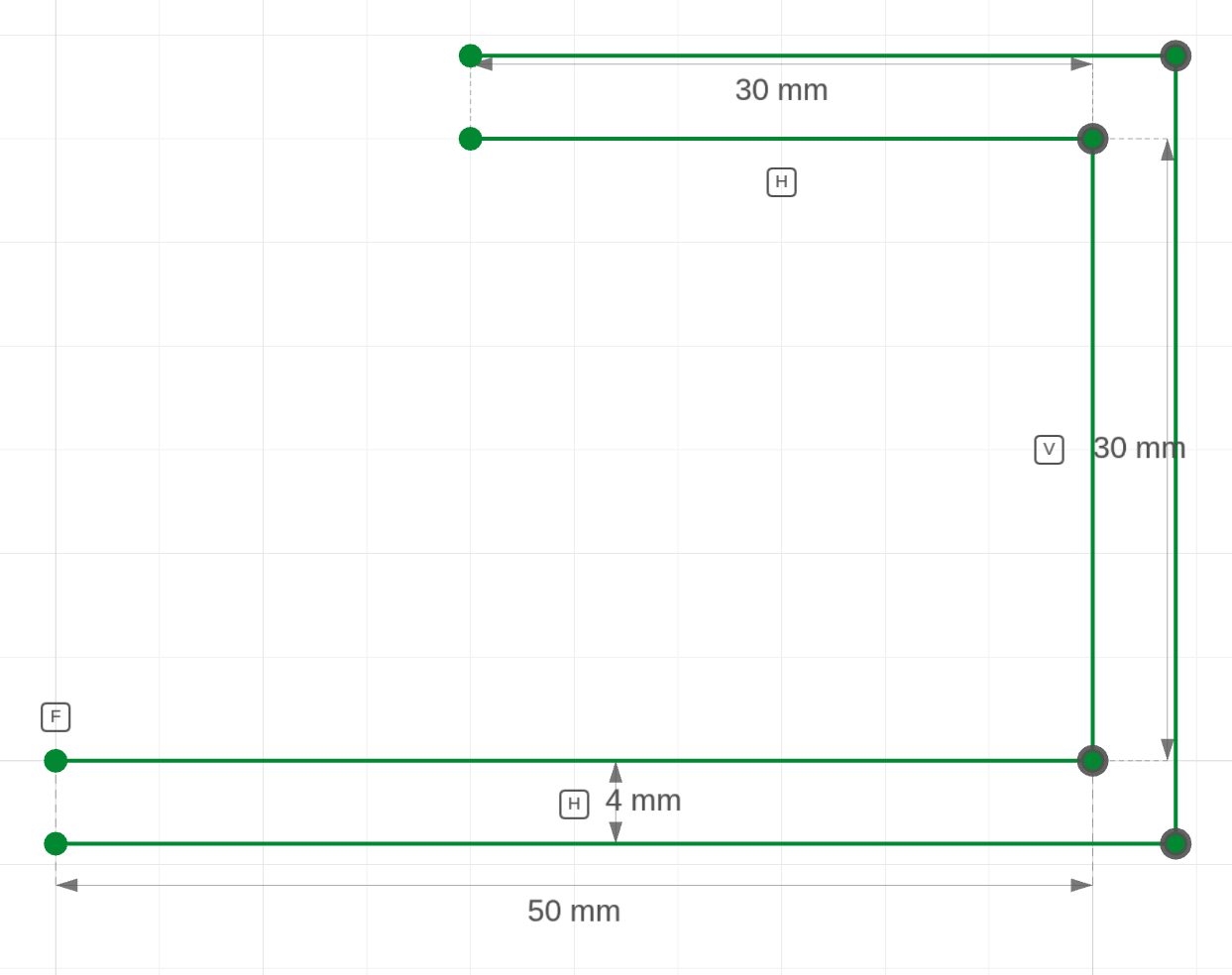
The code behind it
The three offset lines are held 4 from a, b and c. Where the path turns a corner, a coincident joins the two offset lines and they slide to where their rails cross; the two free ends sit straight across from the path's ends without any further constraint.
import { sketch, line } from 'fluidcad/core';
import { coincident, horizontal, vertical, fix, distance, offsetFrom } from "fluidcad/constraints";

sketch("xy", () => {
    // An L-shaped path and its 4 mm offset. The corners are sharp: each
    // offset line is prolonged to where it meets the next one.
    const a = line([0, 0], [50, 0]);
    const b = line([50, 0], [50, 30]);
    const c = line([50, 30], [20, 30]);
    coincident(a.end(), b.start());
    coincident(b.end(), c.start());
    fix(a.start(), [0, 0]);
    horizontal(a);
    vertical(b);
    horizontal(c);
    distance(a.start(), a.end(), 50);
    distance(b.start(), b.end(), 30);
    distance(c.start(), c.end(), 30);
    // The offset: three lines held 4 from a, b and c, and a coincident at
    // each sharp corner. The free ends sit square across from the path's
    // ends on their own.
    const oa = line([0, -4], [54, -4]);
    const ob = line([54, -4], [54, 34]);
    const oc = line([54, 34], [20, 34]);
    offsetFrom([oa, ob, oc], [a, b, c], 4);
    coincident(oa.end(), ob.start());
    coincident(ob.end(), oc.start());
})
In code
offsetFrom(o, s, 5)                          // one entity offset 5 from s
offsetFrom([o1, o2, o3], [s1, s2, s3], 5)    // a chain: o1 follows s1, o2 follows s2, …
- Pairs. The first argument lists the offset entities, the second their sources in the same order:
o1followss1,o2followss2. A line follows a line, an arc an arc, a circle a circle. - The distance is positive. Which side the offset lies on — left or right of a line, outside or inside a circle — is read from where you drew the offset entity, exactly as
distancereads its side. Draw the guess on the side you want. - Corners. An offset entity's end that a
coincidentjoins to an end of another entity of the same statement is a corner of the chain: it slides along its rail to wherever the neighbour's rail crosses it, which is how sharp corners are formed. Every other end sits straight across from its source's end — the free ends of an open chain, and both sides of a tangent junction, where the two offsets meet on their own because their sources are tangent. Add or remove a corner coincident later and the chain re-forms without touching the statement. - Bidirectional. Dimensioning an offset entity drives its source through the tie, and dragging either moves both.
- One value. Edit the distance once and every entity of the chain moves.
The code behind it
A stadium offset outward by 5: the four offset curves in one statement. Every junction of the stadium is tangent, so no coincidents are needed — the offset lines end straight across from the outline's tangent points, which is exactly where the offset arcs start.
import { sketch, line, arc } from 'fluidcad/core';
import { coincident, tangent, horizontal, fix, distance, radius, equal, offsetFrom } from "fluidcad/constraints";

sketch("xy", () => {
    // A pocket outline — a stadium — and the wall around it. The region
    // between the outline and its offset is the wall.
    const top = line([0, 15], [60, 15]);
    const right = arc([60, 15], [60, -15], [60, 0]).cw();
    const bottom = line([60, -15], [0, -15]);
    const left = arc([0, -15], [0, 15], [0, 0]).cw();
    coincident(top.end(), right.start());
    coincident(right.end(), bottom.start());
    coincident(bottom.end(), left.start());
    coincident(left.end(), top.start());
    tangent(top, right);
    tangent(right, bottom);
    tangent(bottom, left);
    tangent(left, top);
    horizontal(top);
    fix(left.center(), [0, 0]);
    distance(left.center(), right.center(), 60);
    radius(left, 15);
    equal(left, right);
    // What the Offset tool writes for a 5 mm outward offset of the four
    // edges: the offset curves themselves, then one statement holding each
    // of them 5 from the edge it follows. The literals are only guesses.
    const l1 = line([0, 20], [60, 20]);
    const a1 = arc([60, 20], [60, -20], [60, 0]).cw();
    const l2 = line([60, -20], [0, -20]);
    const a2 = arc([0, -20], [0, 20], [0, 0]).cw();
    offsetFrom([l1, a1, l2, a2], [top, right, bottom, left], 5);
})
Limits
- An inside offset of an arc or circle must stay smaller than its radius; the statement refuses otherwise.
- Ellipses, beziers and text are not offset entities — the Offset tool writes a selection holding one as an
offset()statement, the derived operation, which handles those curves exactly. - A
.cw()change on a source arc after the offset is drawn turns its offset arc the other way, like any arc drawn to match.