Copy
copy() duplicates a finished solid at several positions, in a row or around an axis. The copies are clones of the shape as it is — no modelling operation is re-run. To re-apply a feature (a cut, an extrude) at each position instead, use Repeat. copy() also copies connectors, the frames an assembly mates to.
In the viewport
- Click Copy on the toolbar. The Copy dialog docks on the right.
- Pick the Type at the top: Linear copies along one or two axes, Circular around an axis. The third type, Along a repeat, is for connectors.
- Click the solid to copy — any face or edge click in the viewport, or its timeline row. It fills the Solids & connectors slot.
- Linear: in Direction 1, fill the Axis slot (click a world axis shown in the viewport, an
axis()feature, an edge, or a connector), enter the Total Count (the original included) and the spacing — the Offset / Total switch decides whether the value is the gap between neighbours or the whole span, spread evenly. Add second direction opens a second axis and count for a grid. - Circular: fill the Axis slot (empty defaults to world Z), the Total Count, and the Angle — Total for the sweep, Offset for the degrees between neighbours.
- Centered spreads the pattern around the original instead of away from it. Skip lists instance indices to leave out (
1, 3). - Click Apply.
Linear copy

The code behind it
The Copy dialog's Linear kind with world X as the direction, a count of 4 and an offset of 150 writes this statement. No target is passed, so it copies every solid built so far — here, the one cylinder.
import { circle, copy, extrude, sketch } from 'fluidcad/core';

sketch("xy", () => {
    circle([150, 150], 100)
})

// A cylinder; extrude() with no distance uses the default of 25.
extrude()

// Four instances in a row along world X, 150 apart — the original counts.
copy("linear", "x", {
    count: 4,
    offset: 150
})
Options:
| Option | Meaning |
|---|---|
count | total number of instances, the original included |
offset | spacing between neighbours |
length | the whole span instead of offset; instances are spread evenly across it |
centered | centre the pattern on the original |
skip | 0-based indices to leave out |
Two directions
Pass two axes for a grid. count, offset and skip then take one value per axis:
copy("linear", ["x", "y"], {
    count: [4, 3],
    offset: [150, 100],
    skip: [[2], [1]]          // skip index 2 along X, index 1 along Y
})
Circular copy

The code behind it
import { sketch, extrude, copy } from 'fluidcad/core';
import { circle } from 'fluidcad/core';

sketch("xy", () => {
    circle([80, 0], 30)
})

// One cylinder, 80 from the Z axis.
extrude(25)

// Six instances spread evenly over a full turn around world Z.
copy("circular", "z", {
    count: 6,
    angle: 360
})
Options:
| Option | Meaning |
|---|---|
count | total number of instances, the original included |
angle | the sweep, cut into count equal steps |
offset | degrees between neighbours instead of angle |
centered | centre the sweep on the original |
skip | indices to leave out |
With angle, the step is always angle / count. Six copies over 360° sit 60° apart; over a partial arc the last copy stops one step short of the angle, so count: 4, angle: 90 puts them at 0°, 22.5°, 45° and 67.5°. Repeat spaces a partial arc the other way, angle / (count - 1), and lands its last instance on the angle: 0°, 30°, 60° and 90°. To match a repeat, give the copy offset: 30, or, for connectors, follow the repeat.
The axis is anything axis-like — a world axis name, an axis() feature, an edge — see Axes. A connector works too: its Z axis, through its origin.
Code forms
import { copy } from 'fluidcad/core';

copy("linear", "x", { count: 4, offset: 150 })            // every solid built so far
copy("linear", "x", { count: 4, offset: 150 }, a, b)      // specific solids
copy("circular", "z", { count: 6, angle: 360 })
copy("circular", axis(e.sideEdges(0)), { count: 6, angle: 180, centered: true })
copy("circular", "z", { count: 6, angle: 360 }, bolt)     // a connector: bolt.instance(1) … bolt.instance(5)
copy(holes, bolt)                                         // a copy of bolt on each instance of the repeat holes
Each copy is an independent solid. Later features reach the copies through their faces and edges, with selections and filters: the value a 3D copy() returns has no .instance(i) accessor. That accessor belongs to sketch copies, and to a copied connector, which is addressed on the connector — bolt.instance(3).
copy() stamps the finished shape. repeat() re-applies a feature so that it interacts with the solid at every position — one solid with four pockets rather than four solids with one pocket each. See Repeat.
Copying connectors
A connector, the frame an assembly mates to, is copied with the same dialog; Repeat refuses connectors and points here. Each copy is a connector with no statement of its own, addressed bolt.instance(1), bolt.instance(2), …: copy 1 of bolt, and so on. An assembly mates one as flange.connectors.bolt.instance(3).
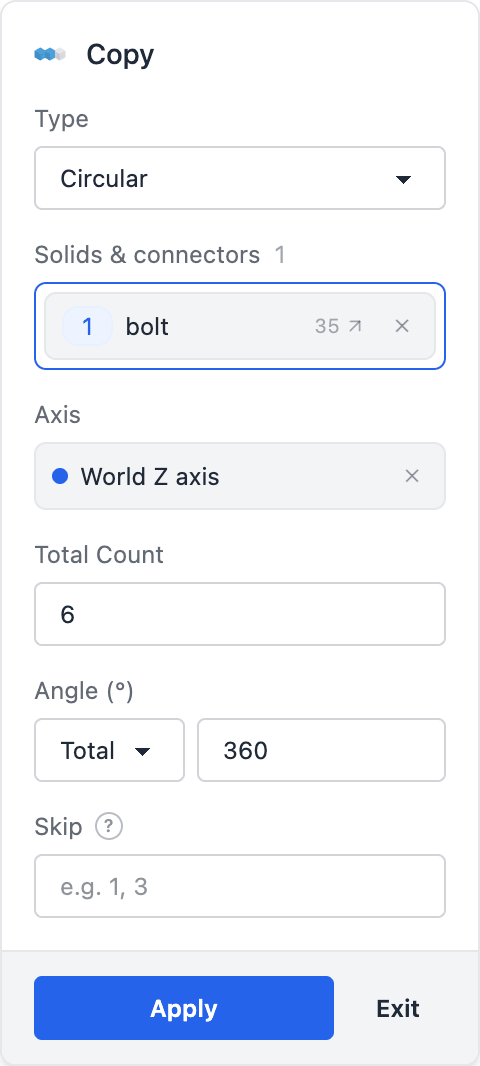
- Click the connector's triad in the viewport (every connector shows while the dialog is open), or right-click its timeline row and choose Copy…. Solids and connectors can share the Solids & connectors slot; each one gets its copies.
- Linear and Circular work as they do for solids, except that a Circular copy of a connector can't be Centered yet: the statement is refused.
- Along a repeat, offered while every target is a connector, puts one copy on each instance of a repeat. Click the Repeat row in the timeline, or the repeated feature in the viewport, to fill the Pattern slot. The count, spacing, axis and skip fields go away: the repeat decides them, and when it changes the copies move with it.
- Triads preview the copies. Apply writes the statement, and the Copy row appears in the timeline like any other feature; clicking it highlights the connector with all its copies.
copy("circular", "z", { count: 6, angle: 360 }, bolt)         // bolt.instance(1) … bolt.instance(5)
copy("circular", "z", { count: 6, angle: 360 }, boss, bolt)   // a boss and the connector on it
copy(holes, bolt)                                             // bolt.instance(k) on instance k of the repeat holes
A copy is the connector's frame moved by the pattern. It does not re-attach to the geometry where it lands, so a connector on a repeated hole should be copied Along a repeat: the copies then stay on the holes, over a partial arc too, where a Circular copy steps differently (above). The numbering, the read-only rules and how a grid renumbers are on the connector page.
An assembly's own connectors are copied from its Connectors rail, Linear or Circular about a world axis or another assembly connector: see Assembly connectors.
Inside a sketch
Called inside sketch(...), copy() duplicates sketch geometry, and the circular form takes a 2D centre point instead of an axis. See Copy in the sketch tools.