property()
property(label, name, value) publishes a value the part computes, under a name the code reads it by and a label the Parameters panel shows. It is the part's value interface, the outbound twin of param(): a parameter is a value the part takes in, a property is a value it hands out, calculated from those parameters. connector() and expose() do the same for mate frames and geometry.
Two consumers read it:
- An assembly reads
instance.properties.<name>on an inserted instance, and gets the values that instance's own parameter overrides produced. They are plain numbers and strings, so they feed.translate(), mate offsets and other inserts' overrides directly. - Another part reads
def.properties.<name>on the definition, and gets the default variant's values, to size itself from a donor.
In the viewport
- Open the Parameters panel from the left rail. Add to names the part the new property goes into, as for a parameter.
- Click + and choose New property. The dialog asks for a Label, the Part and a Value. The Name the code reads the property by is derived from the label as you type (
Pocket diametergivespocketDiameter) and cannot be edited on its own. The value is an expression: type a parameter's name to see what is in scope, and combine them as inwidth - 2 * wall. - Save. The
property()call is written at the end of that part's body, after the geometry, and the panel lists it under Properties with the value the render computed. The pencil on the row edits or deletes the declaration.
Renaming a property follows the new name through every .properties.<name> read of it, in this file and in every file that imports the part, and renames a variable the declaration binds (const w = property('W', 'w', …)) after it. Deleting a property puts its value in place of every read. A value over the part's own parameters (width - 2 * wall) means nothing in another part or assembly, so a property read there cannot be deleted until those reads are rewritten by hand; the dialog names them. A plain value (property('Bolt count', 'boltCount', 4)) is inlined anywhere.
In code
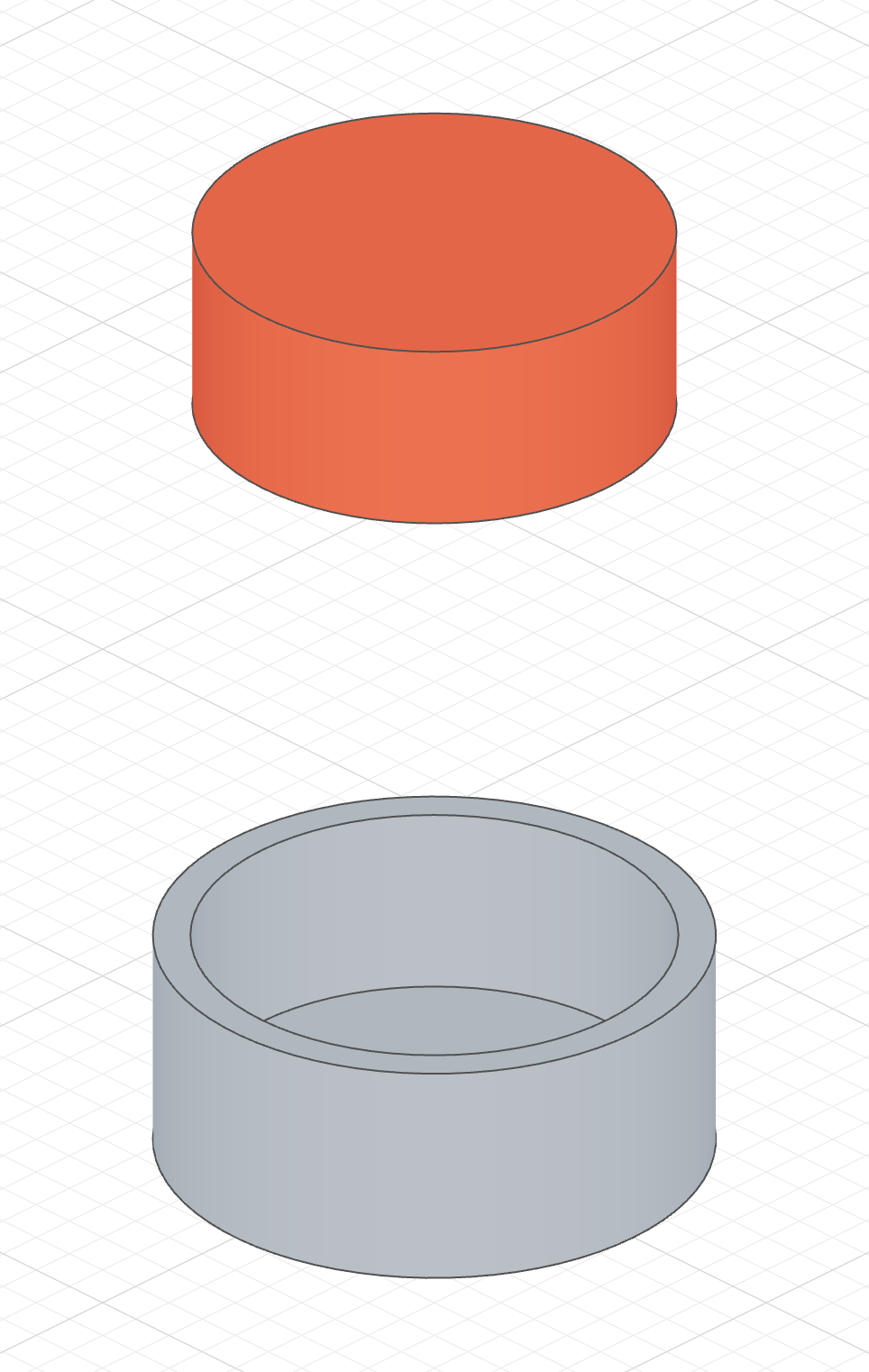
A housing publishing its pocket size
The plug never repeats width - 2 * wall: it reads the housing's pocketDiameter, so changing the housing's wall thickness resizes the plug on the next render.
import { part, param, sketch, circle, extrude, cut, plane, property, origin, color } from 'fluidcad/core';
import { coincident, diameter } from 'fluidcad/constraints';

// A round housing with a pocket cut down from the top. The pocket's size is
// what another part has to fit, so the housing publishes it instead of
// leaving the consumer to redo the arithmetic.
export const housing = part('Housing', () => {
    const width = param('Width', 60, 'number', { min: 30, max: 200, step: 5 });
    const wall = param('Wall', 4, 'number', { min: 2, max: 10, step: 0.5 });
    const height = param('Height', 25);

    sketch('xy', () => {
        const c = circle([0, 0], width);
        coincident(c.center(), origin());
        diameter(c, width);
    });
    extrude(height);
    sketch(plane('xy', { offset: height }), () => {
        const c = circle([0, 0], width - 2 * wall);
        coincident(c.center(), origin());
        diameter(c, width - 2 * wall);
    });
    cut(height - wall);   // down into the body, leaving the floor

    // Published values, computed from the parameters. A part reads them as
    // `housing.properties.<name>`, an assembly as `instance.properties.<name>`.
    property('Pocket diameter', 'pocketDiameter', width - 2 * wall);
    property('Pocket depth', 'pocketDepth', height - wall);
    property('Bolt count', 'boltCount', 4);
});

// A plug sized from the housing's published pocket — in a part file this
// reads the housing's DEFAULT variant.
export const plug = part('Plug', () => {
    const d = housing.properties.pocketDiameter - 0.4;   // 0.2 mm clearance per side
    sketch(plane('xy', { offset: 90 }), () => {
        const c = circle([0, 0], d);
        coincident(c.center(), origin());
        diameter(c, d);
    });
    extrude(housing.properties.pocketDepth);
    color('tomato');
});
In an assembly, every instance carries its own values:
const wide = insert(housing, { Width: 100 }).grounded();
const narrow = insert(housing, { Width: 50 }).translate(120, 0, 0);
wide.properties.pocketDiameter;     // 92
narrow.properties.pocketDiameter;   // 42

// Size the base plate from the first housing's pocket and place it on the
// pocket floor — no number from the housing's file is repeated here.
insert(plate, { Width: wide.properties.pocketDiameter - 0.4 })
    .translate(0, 0, wide.properties.pocketDepth);
plate is the mounting plate from the Param page; its Width is one of its parameters.
Signature
property(label, name, value)
| Argument | Meaning |
|---|---|
label | What the Parameters panel shows for the property. |
name | A plain identifier, unique within the part — what properties.<name> reads. |
value | A number, string, boolean, or an array of numbers or strings. Returned unchanged, so const w = property('W', 'w', …) declares a local and publishes it in one statement. Numbers are handed over verbatim, in the part file's unit, like a parameter override. |
A misspelled name does not come back undefined: reading a property the part never declared throws an error naming the ones it does declare.
What a property can hold
A property is computed while the part's body runs, from its parameters and ordinary arithmetic. Nothing is built at that point, so a property cannot measure the part's geometry: a bounding box, a volume, or the position of a face after a fillet are not available. Geometry is published with expose(), and passing a sketch or a selection to property() is refused.