part()
part(name, callback) declares a named part. Everything the callback does — sketches, features, connectors, exposures, parameters, properties — belongs to that part.
import { part, sketch, circle, extrude } from 'fluidcad/core';

export const disc = part('Disc', () => {
    sketch('xy', () => {
        circle([0, 0], 40);
    });
    extrude(5);
});
Two rules
- Every part is exported. A part is
export const disc = part('Disc', () => { … })at the top level of its file: the export is how an assembly imports it and how the Insert dialog finds it. A.name()or.material()chain on the statement, a top-levelconstlisted in anexport { disc }clause, and an exported function that returns the part (export const bolt = (length = 20) => part('Bolt', …)) count as exported too. Apart()nothing exports, one exported only asdefault, and one written inside another part's or assembly's body are refused. - Part names are unique within a file. The name is what the Part Parameters panel, the configurations tables and the timeline tell the file's parts apart by. The first
part()of a name builds; a later one with the same name is refused.
A refused part does not build: its timeline row shows the reason as a build error and the rest of the file renders. The messages name the fix:
part 'Disc': a part must be exported — write it as export const disc = part('Disc', …) at the top level of the file.
part 'Disc': another part in this file is already named 'Disc' — give each part its own name.
An agent writing the file through the MCP server is stopped before the file is written, with the same messages.
In the viewport
Click Part on the toolbar. FluidCAD appends export const part1 = part('Part 1', () => {}) (the next free Part N) to the file, activates it, and routes the next features into its body. Rename it from the timeline row's right-click menu: the name in part('…') is rewritten and the exported variable is renamed after it (Fixed leaf binds fixedLeaf), in the files that import the part too. A name another part of the file already has is refused. There is no Apply: the statement is written the moment you click.
The definition is lazy
part() returns a definition, not built geometry. The callback runs:
- when the file renders on its own — the open part file stays what-you-see-is-what-you-get, so every part of the file shows in the viewport, inserted or not;
- once per variant when an assembly inserts it:
insert(def)andinsert(def, { Width: 120 })are two builds, while twoinsert(def, { Width: 120 })share one.
Because the body runs later, it must be self-contained: read parameters with param() inside the callback, not from variables computed outside it.
Arguments
| Argument | Meaning |
|---|---|
name | The part's display name — in the timeline, the Parts panel, and the STEP product tree on export. |
callback | The body. Its return value is ignored; publish geometry with expose(). |
What the definition gives you
| Member | Meaning |
|---|---|
def.features.<name> | The source object an expose() published, for another part to build on: extrude(15, donor.features.profile). |
def.properties.<name> | A value a property() published, from the default variant: donor.properties.pocketDiameter. |
insert(def) | In an assembly: an instance of the part with instance.connectors.<name>, instance.features.<name> and instance.properties.<name> bound to it. |
Material
A part can carry a material, and Shape properties turns its volume into a mass with that material's density.
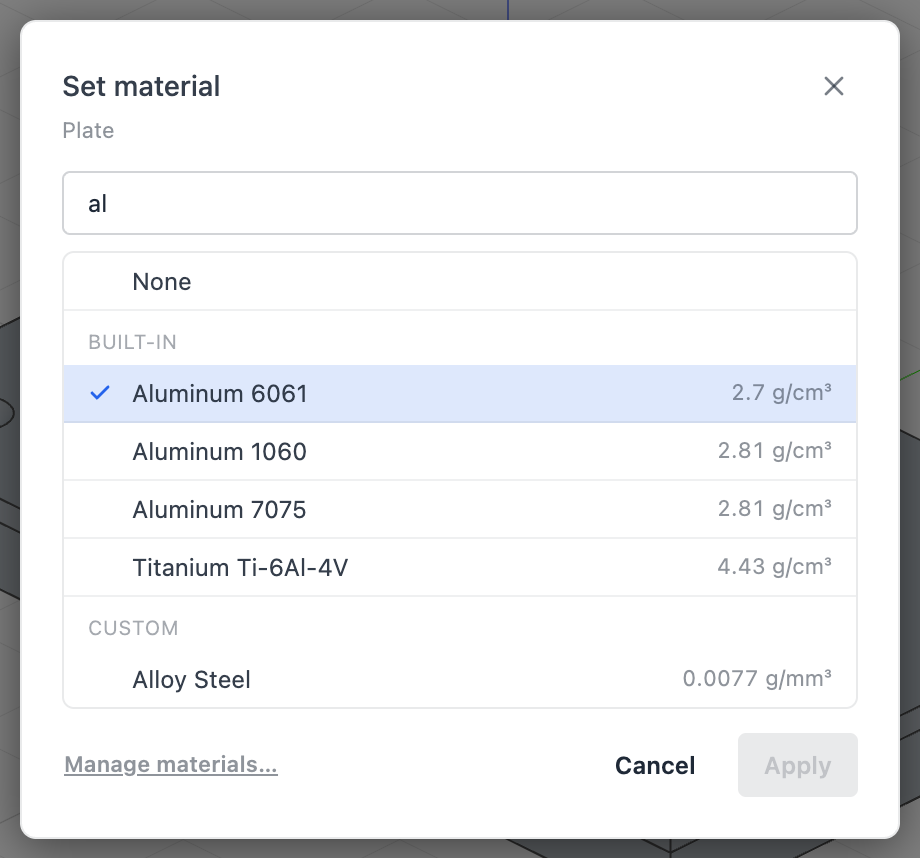
- Click the ⋮ button at the right edge of the part's row in the History panel (or right-click the row) and choose Set material….
- The Set material dialog lists the built-in materials under Built-in and the custom ones under Custom — the project's own, tagged in project, and yours from Settings → Materials. The current one is checked and first in its group; None removes the material. Click a row and Apply.
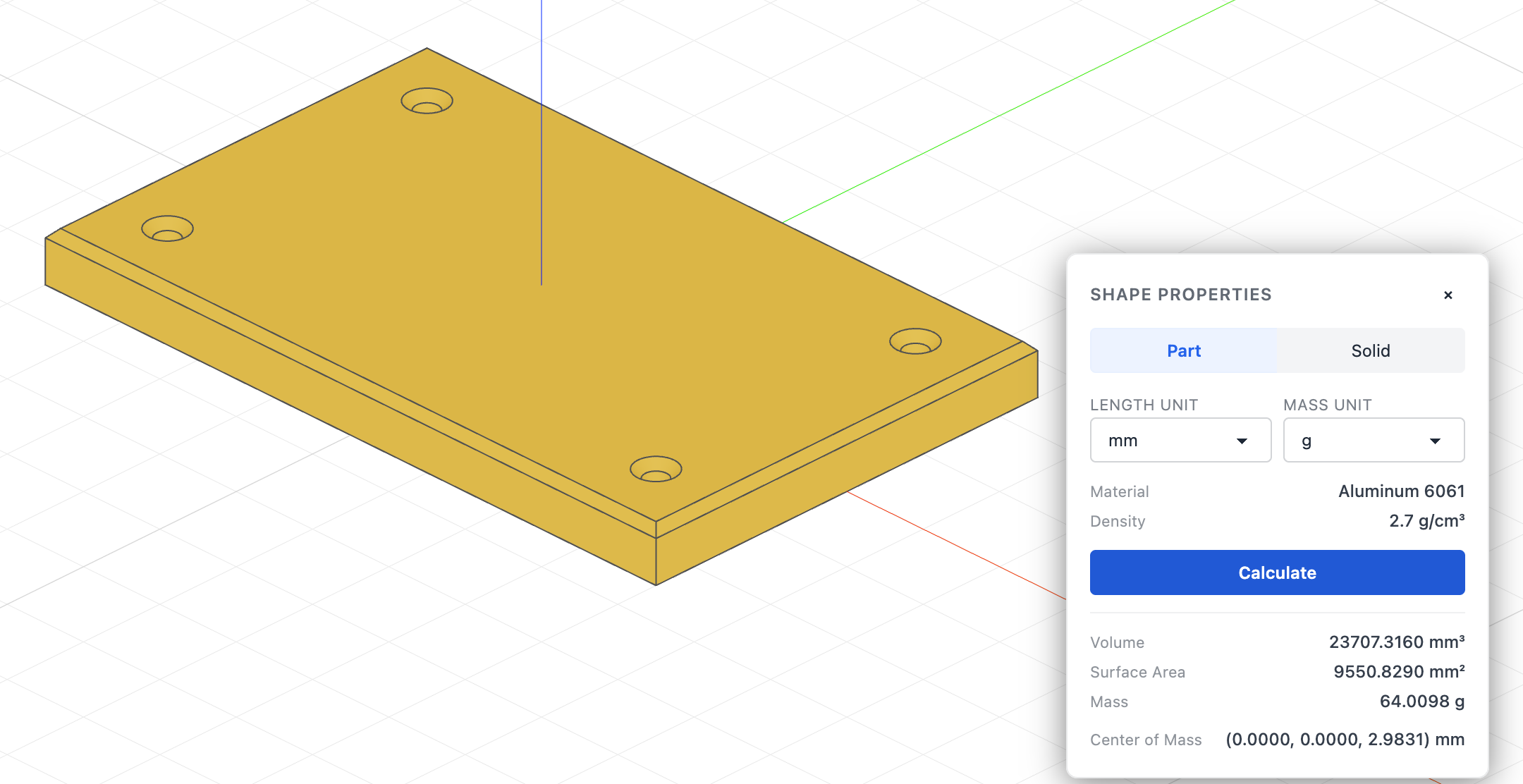
- Open Shape properties (the scale icon at the bottom right), choose the Part tab, click the part in the viewport — every solid of the part highlights — and click Calculate.
The code behind it
import { part, sketch, line, circle, extrude, chamfer } from 'fluidcad/core';
import { coincident, distance, fix, horizontal, vertical } from 'fluidcad/constraints';

// A mounting plate: an 80 x 50 rectangle with a clearance hole near each
// corner, 6 mm thick, top edges chamfered. Its material is a chain on the
// part() statement — Set material… on the timeline row writes it.
export const plate = part('Plate', () => {
    sketch('xy', () => {
        const b = line([-40, -25], [40, -25]);
        const r = line([40, -25], [40, 25]);
        const t = line([40, 25], [-40, 25]);
        const l = line([-40, 25], [-40, -25]);
        coincident(b.end(), r.start());
        coincident(r.end(), t.start());
        coincident(t.end(), l.start());
        coincident(l.end(), b.start());
        horizontal(b);
        horizontal(t);
        vertical(r);
        vertical(l);
        fix(b.start(), [-40, -25]);
        distance(b.start(), b.end(), 80);
        distance(r.start(), r.end(), 50);
        // One M5 clearance hole inset 8 mm from each corner.
        for (const sx of [-1, 1]) {
            for (const sy of [-1, 1]) {
                circle([sx * 32, sy * 17], 2.75);
            }
        }
    });
    const e = extrude(6);
    chamfer(1, e.endEdges());
}).material('fluidcad-aluminum-6061');
The pick is a .material('<id>') chain on the part() statement, next to where .name() goes. The argument is an id, never a density:
| Id | Where it comes from |
|---|---|
fluidcad-steel-1020, fluidcad-stainless-304, fluidcad-aluminum-6061, fluidcad-aluminum-1060, fluidcad-aluminum-7075, fluidcad-brass-c260, fluidcad-copper, fluidcad-titanium-6al4v, fluidcad-cast-iron-gray, fluidcad-bronze, fluidcad-pc, fluidcad-abs, fluidcad-pla, fluidcad-nylon-pa6, fluidcad-carbon-fiber, fluidcad-pine, fluidcad-carbon-steel | Built in. Always available; listed under Built-in. |
alloy-steel, acme-pla, … | A key of the materials map in the project's fluidcad.json. Listed under Custom, with your own materials from Settings → Materials; applying one of those copies its entry into the map, so the project carries what it uses. |
A material that is in neither list is added first — to Settings → Materials, or by hand to fluidcad.json — then picked. An id the lists do not know is a warning rather than a build error: the part still builds, its row shows a warning triangle, and Shape properties reads Unknown material: <id> with no mass.
Only parts carry a material. A solid outside any part is measured with a material picked in Shape properties for that calculation alone; nothing is written to the file. See Shape properties.
Export it
An assembly can only insert what the part file exports:
export const bracket = part('Bracket', () => { /* … */ });
The Insert dialog scans the workspace for exported definitions and lists each with a thumbnail and the file it came from. Two files may each export a part — the assembly's import gets a local alias automatically when the dialog writes it.
Fusion boundary
Solids inside a part fuse with each other and with nothing outside it: put a bolt and the bracket it sits in into two parts and they stay two solids. Inside one part, .new() keeps a feature as a separate body.
Units
The part's numbers are in its file's unit. Inserted into a project with a different unit it is rescaled on the way in — a 2 in boss is 50.8 mm in a millimetre assembly. insert(def, { Length: 10 }) means 10 in the part's unit. See Units.