Rib
rib() turns a sketch line (the spine) into a thickened wall that grows until it meets the surrounding solids. It's the standard tool for adding stiffening webs inside shelled parts.
// @screenshot waitForInput
import { sketch, rect, extrude, shell, hLine, rib, fillet } from 'fluidcad/core';

sketch("top", () => {
    rect(100, 50).centered();
})

const box = extrude(30)
const s = shell(-4, box.endFaces())
fillet(2, s.internalEdges())

sketch(box.endFaces(), () => {
    hLine([-50+4, 0], 30)
});

rib(5).draft(2);
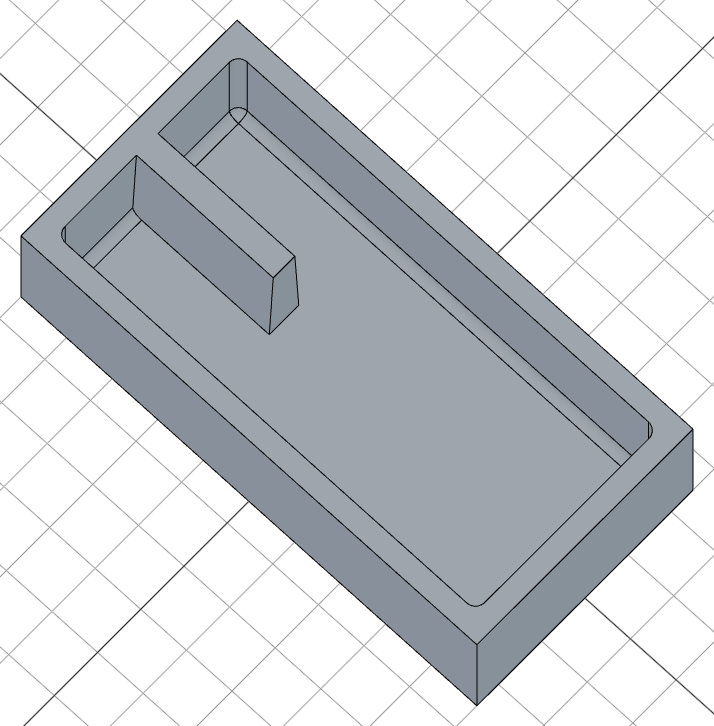
The first argument is the wall thickness. The rib is centered on the spine, extruded perpendicular to the sketch plane, and conformed to fit the surrounding cavity.
Thickness direction
The sign of the thickness controls which way the rib grows from the sketch plane:
- Positive (e.g.
5): extrudes opposite the sketch normal — typically into the cavity when the sketch sits on top of a face - Negative (e.g.
-5): extrudes along the sketch normal
Extending the spine
By default the rib's length matches the sketch wire exactly. Call .extend() to push the wall's endpoints outward until they blend into the surrounding walls:
// @screenshot waitForInput
import { sketch, rect, extrude, shell, hLine, rib, fillet } from 'fluidcad/core';

sketch("top", () => {
    rect(100, 50).centered();
})

const box = extrude(30)
const s = shell(-4, box.endFaces())
fillet(2, s.internalEdges())

sketch(box.endFaces(), () => {
    hLine([-50, 0], 30)
});

rib(5).extend().draft(2);
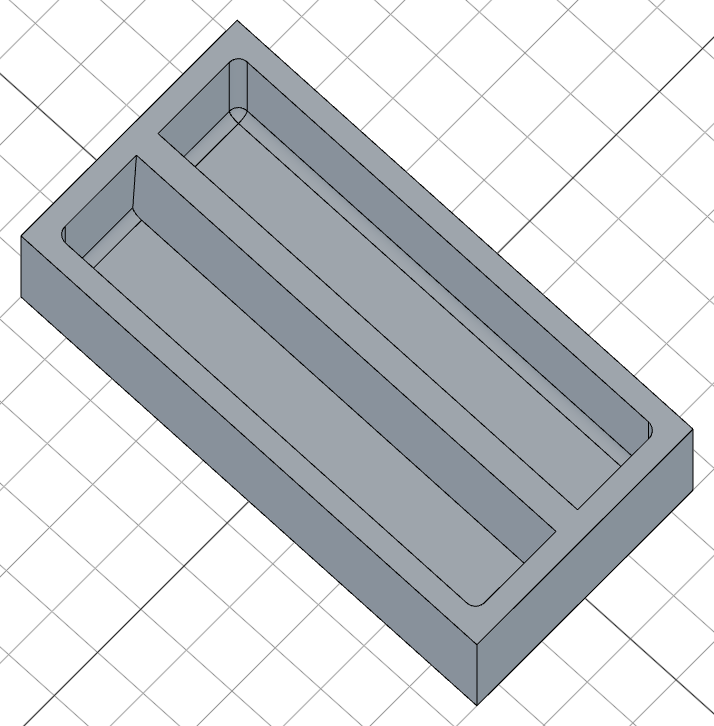
This is useful when you draw a short spine but want the rib to terminate cleanly against the cavity wall.
Parallel mode
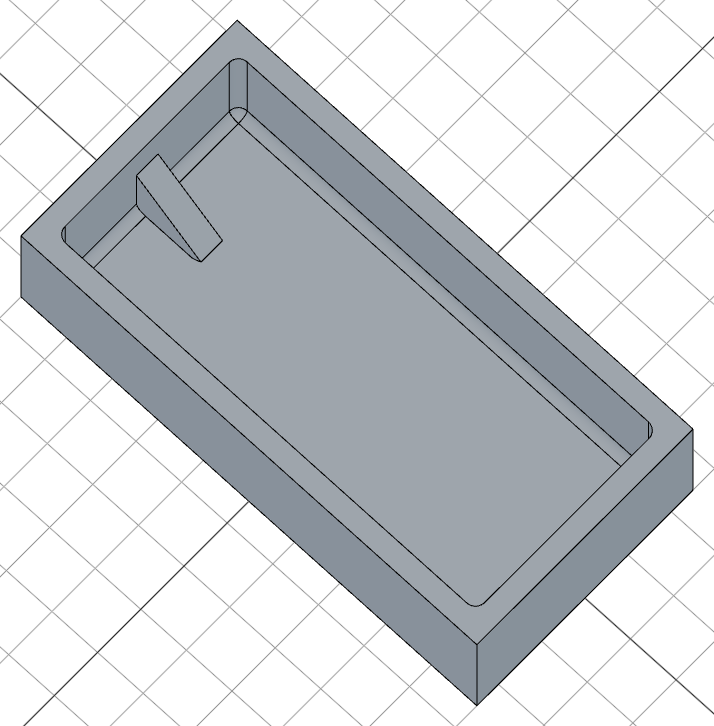
.parallel() flips the extrusion direction from "perpendicular to the sketch plane" to "in-plane, perpendicular to the spine". The sketch line itself becomes one face of the wall.
This is the more natural way to draw ribs that follow a side profile — sketch a slanted line on the front plane, and the rib grows down/sideways to meet the surrounding shell:
// @screenshot waitForInput
import { sketch, move, rect, extrude, shell, rib, fillet, aLine } from 'fluidcad/core';

sketch("top", () => {
    rect(100, 50).centered();
})

const box = extrude(30)
const s = shell(-4, box.endFaces())
fillet(2, s.internalEdges())

sketch("front", () => {
    move([-50+4, 20])
    aLine(-45, 20)
});

rib(5).parallel();
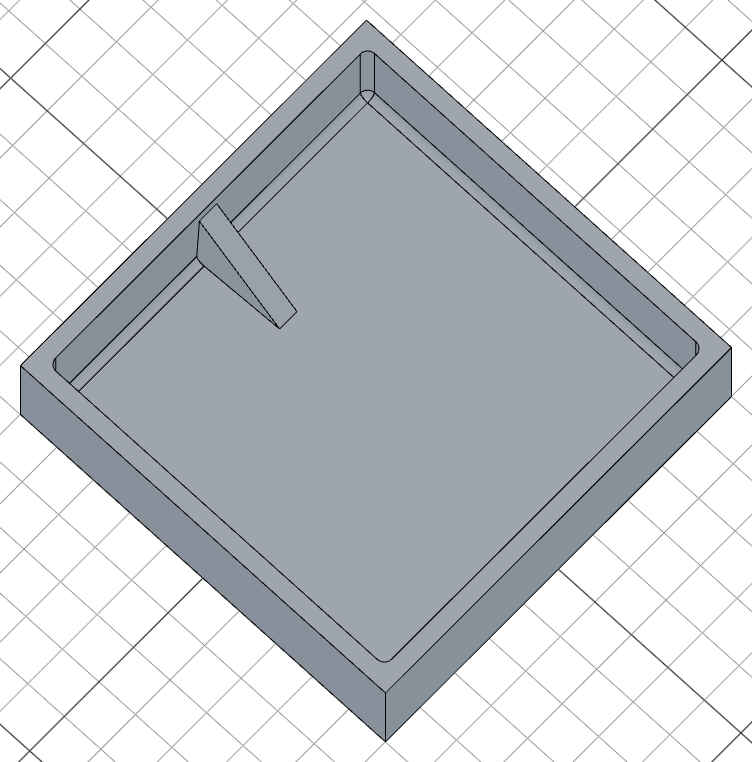
Combine .parallel() with .extend() to make the rib reach into the cavity walls at both ends:
// @screenshot waitForInput
import { sketch, move, rect, extrude, shell, rib, fillet, aLine } from 'fluidcad/core';

sketch("top", () => {
    rect(100).centered();
})

const box = extrude(30)
const s = shell(-4, box.endFaces())
fillet(2, s.internalEdges())

sketch("front", () => {
    move([-40, 20])
    aLine(-45, 20)
});

rib(5).parallel().extend().draft(-3);
Draft
Add a taper with .draft(angle). Positive angles narrow the rib toward its tip; negative angles widen it:
rib(5).draft(2)        // 2° taper, narrowing
rib(5).draft(-3)       // 3° taper, widening
Only the long wall faces taper — the small cap faces at the spine endpoints stay vertical.
Scoping the rib
By default a rib finds all solids in the scene to fuse with. Use .scope() to limit which solids the rib conforms to and fuses with — it works on its own, no need to combine with .new():
rib(5).scope(target) // only consider `target` when conforming + fusing
.new() keeps the rib as a separate solid instead of fusing. Whenever you use .new() you should also pass a .scope(...) so the rib still has a target cavity to conform to:
// @screenshot waitForInput
import { sketch, move, rect, extrude, shell, rib, fillet, aLine, circle } from 'fluidcad/core';

sketch("top", () => {
    rect(100, 50).centered();
})

const box = extrude(30)
const sh = shell(-4, box.endFaces())
fillet(2, sh.internalEdges())

sketch("top", () => {
    circle(30)
});

const s = extrude(50).draft(-5)

sketch("front", () => {
    move([-40, 20])
    aLine(45, 20)
});

rib(5).parallel().extend().new().scope(s).draft(-4);
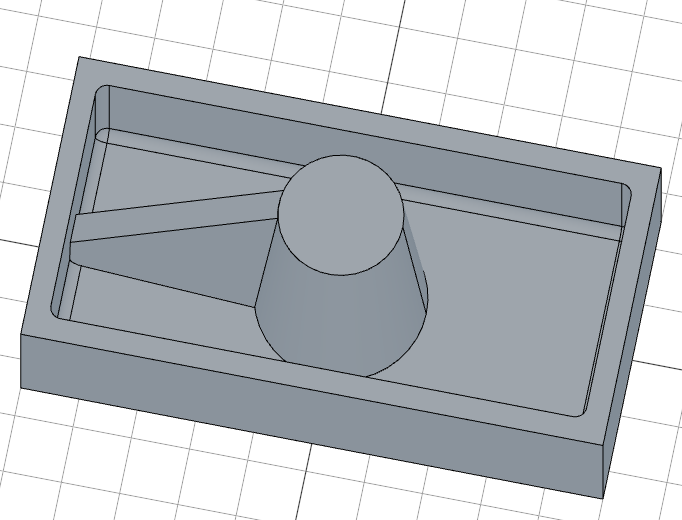
Here the rib is attached to a tapered cylinder rather than the outer box — the scope tells the rib which walls to conform to.
Curved enclosures
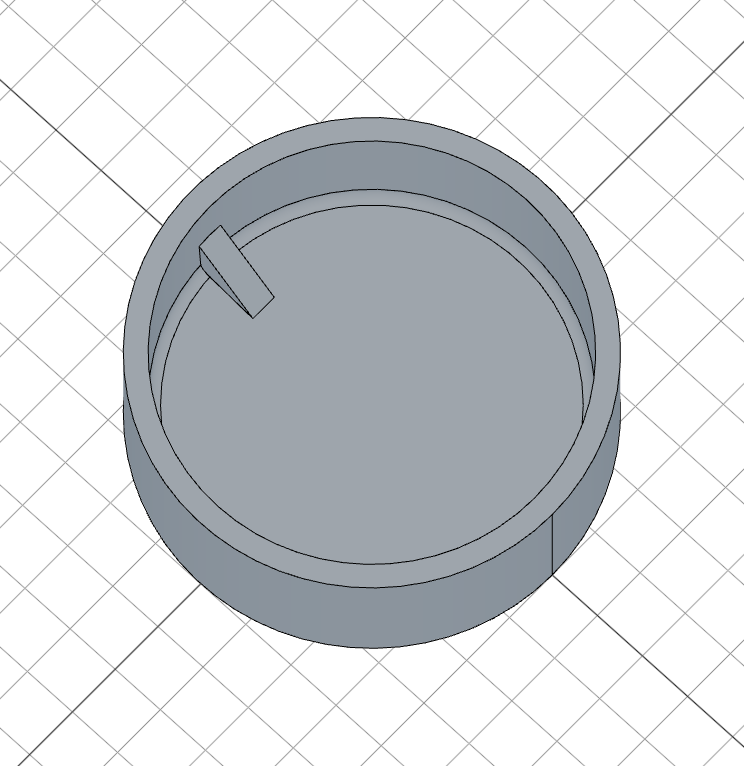
The rib conforms to whatever cavity surrounds it, so it works inside curved or circular shells just as well as rectangular ones:
// @screenshot waitForInput
import { sketch, move, extrude, shell, rib, fillet, aLine, circle } from 'fluidcad/core';

sketch("top", () => {
    circle(80)
})

const box = extrude(30)
const sh = shell(-4, box.endFaces())
const s = fillet(2, sh.internalEdges())

sketch("front", () => {
    move([-40, 20])
    aLine(-45, 20)
});

rib(5).parallel().extend().draft(3).new().scope(s);
Patterning ribs
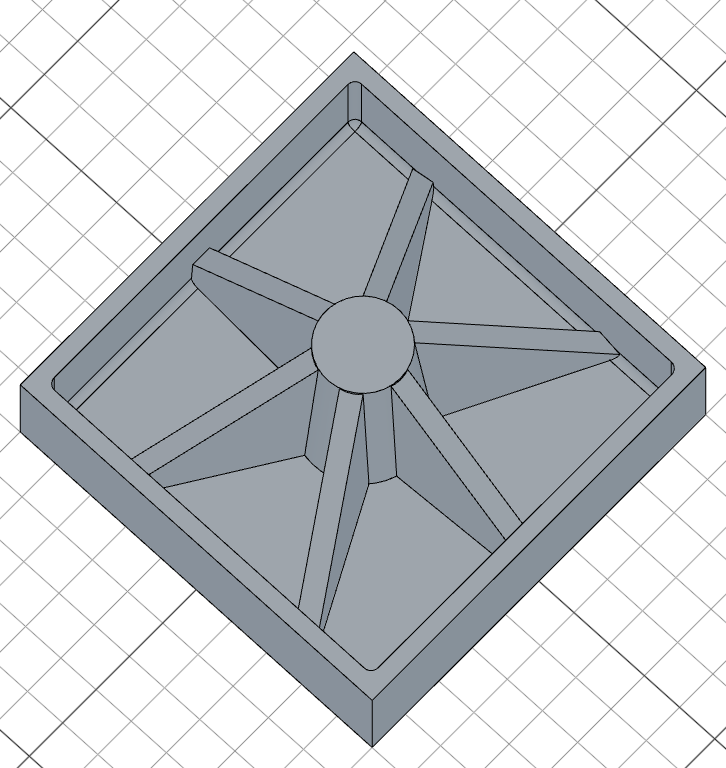
Capture the rib in a variable and pass it to repeat() to pattern it around an axis:
// @screenshot waitForInput
import { sketch, move, rect, extrude, shell, rib, fillet, aLine, circle, repeat } from 'fluidcad/core';

sketch("top", () => {
    rect(100).centered();
})

const box = extrude(30)
const sh = shell(-4, box.endFaces())
fillet(2, sh.internalEdges())

sketch("top", () => {
    circle(30)
});

const s = extrude(50).draft(-5)

sketch("front", () => {
    move([-40, 20])
    aLine(45, 20)
});

const r = rib(5).parallel().extend().new().scope(s).draft(-4);

repeat("circular", "z", {
    count: 6,
    angle: 360
}, r)
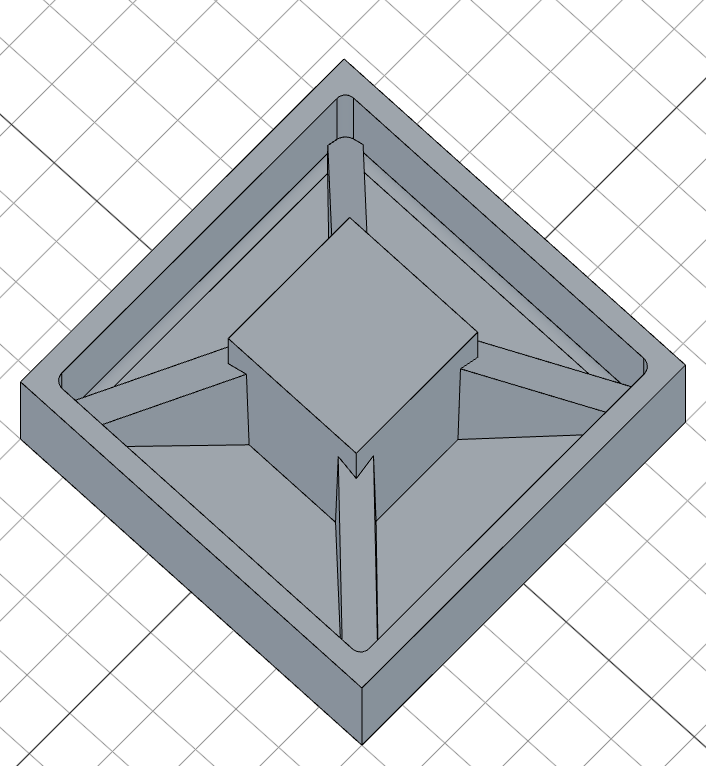
The sketch plane can be tilted too — pair a rotated plane() with a circular pattern to fan ribs out at an angle:
// @screenshot waitForInput
import { sketch, move, rect, extrude, shell, rib, fillet, aLine, repeat, plane } from 'fluidcad/core';

sketch("top", () => {
    rect(80).centered();
})

const box = extrude(30)
const s = shell(-4, box.endFaces())
fillet(2, s.internalEdges())

sketch("top", () => {
    rect(30).centered();
});

extrude(50)

const p = plane("front", { rotateY: 45 })

sketch(p, () => {
    move([-40, 18])
    aLine(45, 20)
});

const r = rib(6).parallel().extend().draft(-1);

repeat("circular", "z", {
    count: 4,
    angle: 360
}, r)
Accessing geometry
const r = rib(5).extend()

r.startFaces()     // profile face at the sketch plane
r.endFaces()       // face where the rib meets the cavity wall
r.sideFaces()      // long wall faces of the rib
r.capFaces()       // small cap faces at the spine endpoints
r.startEdges()     // edges on the start faces
r.endEdges()       // edges on the end faces
r.sideEdges()      // edges along the side walls
r.capEdges()       // edges on the cap faces
Fusion scope
rib(5).add()                  // fuse with all touching solids (default)
rib(5).scope(target)          // limit conform + fuse to `target`
rib(5).new().scope(target)    // keep as separate solid, conform to `target`