Parts
When you build models with multiple components, auto-fusion can work against you — you don't want a bolt to merge into a bracket. part() creates isolation boundaries so components stay separate.
Defining a part
Wrap modeling operations in a part() call:
import { part, sketch, extrude } from 'fluidcad/core';
import { rect, circle } from 'fluidcad/core';

part("base", () => {
    sketch("xy", () => {
        rect(120, 80).centered()
    })
    extrude(10)
})

part("pillar", () => {
    sketch("xy", () => {
        circle(30)
    })
    extrude(60)
})
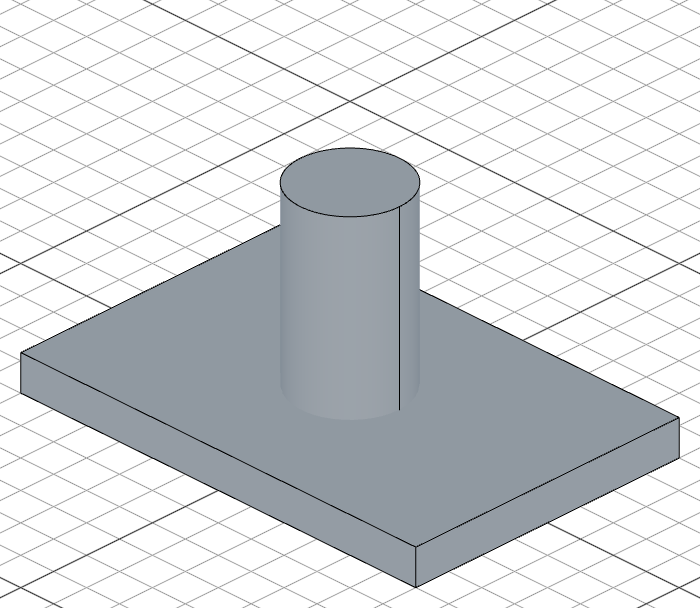
Shapes inside "base" fuse with each other, and shapes inside "pillar" fuse with each other, but the two parts stay separate — even though the pillar sits on top of the base.
Creating reusable parts
To make a part reusable and parametric, wrap it in a function that accepts parameters and call it from wherever you need it:
// parts/file1.fluid.js
import { cylinder, select, color, part } from 'fluidcad/core';
import { face } from 'fluidcad/filters';

export function createPart(diameter = 50, c = "red") {
    return part("part1", () => {
        cylinder(diameter, 80);
        select(face());
        color(c);
    });
}
Then import and call the function from another file:
// parts/file2.fluid.js
import { translate, copy } from 'fluidcad/core';
import { createPart } from './file1.fluid.js';

createPart(40, "yellow")
const c1 = translate(100)
const c2 = createPart(20, "blue")

copy("linear", "y", {
    count: 5,
    offset: 100
}, c1, c2)
This pattern lets you build libraries of reusable parametric components. Each call to the function creates a new independent part instance with its own parameters.