Configurations
A configuration is a named set of values for an assembly's own parameters. A gearbox that ships as a 2:1 and a 3:1 ratio, a frame that comes compact or wide: the parameters are declared once, and each configuration is one row of a table that lists only the values it changes. Everything else stays shared, so a fix to the model is a fix to every configuration.
The table is a configurations({...}) statement at the top of the assembly body. The Assembly Parameters panel switches between its rows, a parent assembly inserts a row by name, and export writes one file per row.
const configuration = configurations({
    'Ratio 2:1': { 'Wheel teeth': 24 },
    'Ratio 3:1': { 'Pinion teeth': 10, 'Wheel teeth': 30 },
});
const pinionTeeth = param('Pinion teeth', 12, 'number', { min: 8, max: 24, step: 1 });
const wheelTeeth = param('Wheel teeth', 12, 'number', { min: 8, max: 48, step: 1 });
Default is always there: it is the param() literals, the values the declarations themselves carry. A row leaves a parameter out to keep its literal.
A part declares configurations the same way, in its own body; Part configurations covers them in the part workspace.
In the viewport
All of this happens in the assembly workspace's Assembly Parameters panel, in the Configuration row under its header.
Creating a configuration
- Click Add configuration under the panel's header (it stands in for the configuration dropdown while the file has no table). Type a name — spaces are fine,
Defaultis taken — and confirm. - The first row creates the
configurations({...})statement as the first line of the assembly body and addsconfigurationsto the import line. The new configuration is empty, a copy of Default, and it is now the one on screen. - Set the parameters until the model looks the way the configuration should: drag a slider, type a width, tick a checkbox. Each value goes into the new row as you set it (see Changing values).
To start from another configuration rather than from Default, show that one and use Duplicate….
Switching
Once the file has a table, the Configuration row shows a dropdown: Default, then the rows in the order the table declares them. Picking one re-renders the assembly with that row's values. The choice is not written into the source — switching never creates a diff — and it is remembered per file, so the workspace reopens on the configuration you left.
While a row is active, the label of each parameter the row sets is bold, and a parameter the row leaves out says default beside its control: its value is the literal.
Changing values
The panel writes what you change into the source, into the configuration on screen:
- With a row on screen, a value you change becomes that row's value: setting Wheel teeth to 36 on Ratio 3:1 writes
'Ratio 3:1': { …, 'Wheel teeth': 36 }. A parameter the row left at its default joins the row, and its label turns bold. - On Default, a value you change is the parameter's own literal:
param('Wheel teeth', 36, …). An assembly without aconfigurations()table has only Default, so there the panel always edits the literals.
A value is written once you finish with it: Enter or leaving a field, letting go of a slider, a pick in a dropdown, a click on a checkbox. Each one is one edit of the file and one undo step in the editor. A value the parameter does not take — outside its minimum and maximum, not one of its options — is refused with a message, and so is a change the source cannot take as written: a table or a default written as an expression (Width: base * 2). Either way the file is left as it was.
On a row, a bold label gets a ↺ when you point at it. It removes that value from the row: the parameter goes back to its default and says default again.
Switching to another configuration never asks anything: every value you changed is already in its row.
In the read-only viewer, such as a model embedded in a page, the panel cannot write: a change applies to that view only, and the ↺ in the panel's header puts every value back.
The actions menu
The ⋮ button at the end of the Configuration label line opens the row actions:
| Action | What it does |
|---|---|
| Add configuration… | A new row from the values on screen, then shows it. On Default the row starts empty; with a row on screen it copies that row's values. |
| Duplicate… | The same as Add configuration; with a row active, the name is prefilled as <row> copy. The active row is left as it was. |
| Rename… | Renames the active row in the table. |
| Delete | Removes the active row after asking, and shows Default. Deleting the last row removes the statement and its import too — or leaves configurations({}) when the body reads its return value. |
| Manage… | Opens the whole table as a grid (below). |
Renaming a parameter through its pencil renames its key in every row; deleting a parameter removes its value from every row.
The Manage configurations grid
Manage… opens the table as a grid: one row per configuration, one column per parameter of the assembly, every cell the parameter's own control.
- The first row is Default, read-only: the literals. Edit those with the parameter's pencil.
- A blank cell inherits the literal and shows it dimmed. Edit the cell to set it; its ↺ clears it back to inheriting.
- A cell the source writes as an expression (
Width: base * 2) is shown as its source text and is read-only; ↺ still clears it. - Each row's name is a text field: type to rename it. Click a row to select it; Add row adds an empty configuration, Duplicate row copies the selected one, and Delete row marks it for removal after asking.
- A range copied from a spreadsheet pastes into the grid. With a header row, its columns are matched to the parameters by label, and a first column of names adds or updates the rows of those names; without one, the range is laid out from the selected cell. A paste that cannot land changes nothing and says why under the grid; a column that matches no parameter is ignored with a warning.
- Nothing is written until Apply, which rewrites the table statement once — one undo step, one render. Cancel drops everything.
The grid lists the parameters the current render declared. A parameter that only one row declares (see In code) appears only while that row is on screen.
Inserting a configuration
When a sub-assembly declares configurations, the Insert dialog's parameter page shows a Configuration select above that instance's form. Picking a row fills the form with the row's values; change a control after that and only the values that differ from the row go into the statement:
insert(gearbox, 'Ratio 3:1');
insert(gearbox, 'Ratio 3:1', { Extension: 90 });
The Edit parameters… dialog (the instance's row menu in the Parts panel) has the same select. Choosing another row rewrites the name in the statement, and choosing Default removes it; the values the statement already overrides stay as they are, on top of whichever row you pick. In the Parts panel, an instance inserted with a configuration shows it after its source name: gearbox · Ratio 3:1.
Exporting from the viewport
In an assembly with configurations, exporting the Whole assembly opens the Export dialog with a Configuration select at the top, set to the row on screen. Pick another row to export that one instead, or All configurations (.zip) to export Default and then every row into one zip, gearbox-configurations.zip, holding gearbox.step, gearbox-Ratio-2-1.step and gearbox-Ratio-3-1.step. All configurations is all or nothing: if any row fails, no zip is delivered and the message names the row.
A single part chosen from the Export menu exports in its own frame, as on screen, without the select.
Mates are solved in the viewport for the configuration on screen. A configuration exported without being on screen — another row in the select, or every row but the one on screen under All configurations — is rendered for the export alone and places its parts where the source puts them (.translate() / .rotate()), not where the joints would. Switch to the row first for its mated layout. PNG export always captures the configuration on screen.
In code
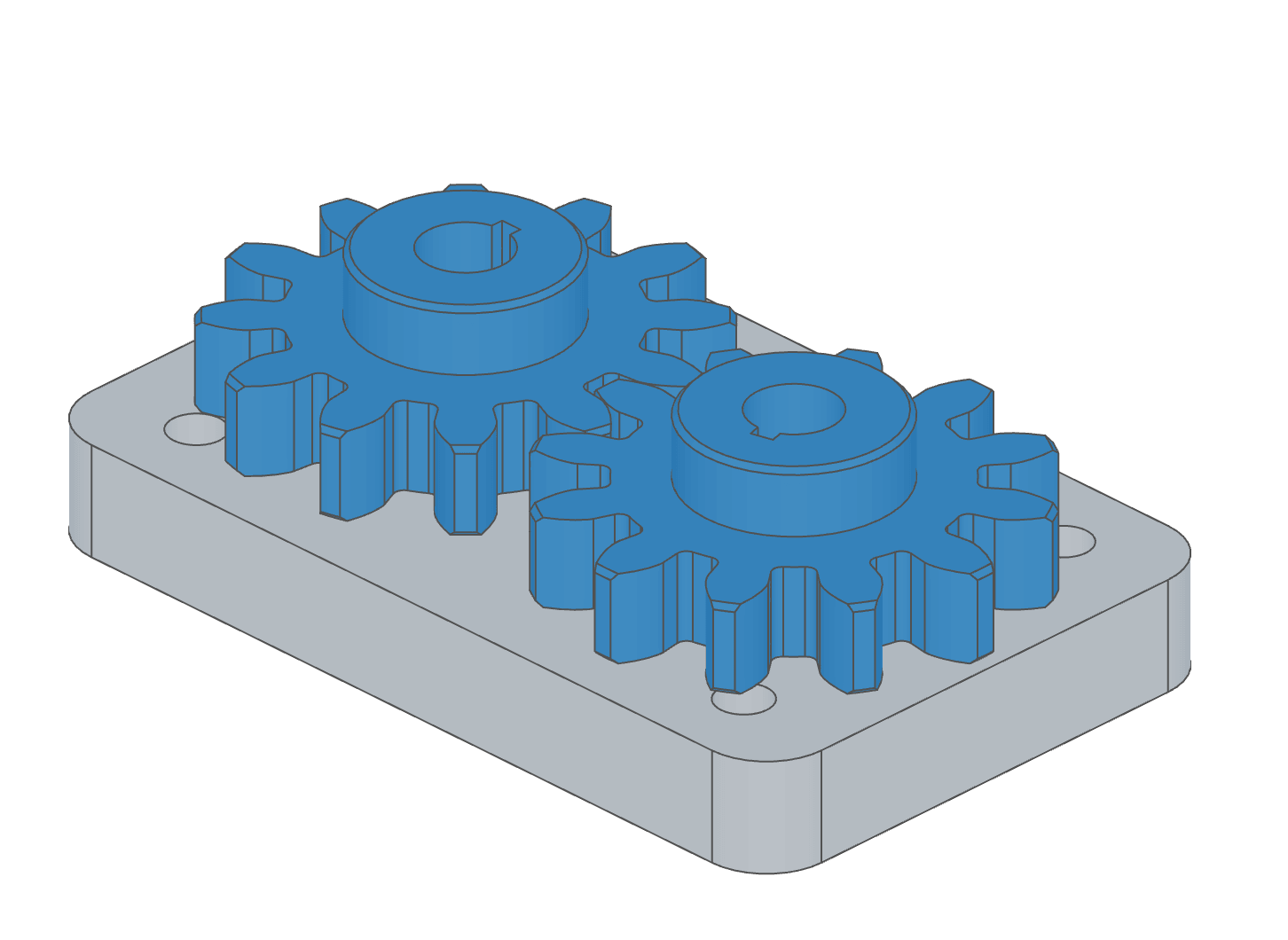
A gearbox in three ratios
plate and gear are the parts from the assembly introduction and the gear train; the gear's only parameter is teeth.
import { assembly, insert, param, configurations, mate, relation } from 'fluidcad/core';
import { plate } from './asm-plate.part.js';
import { gear } from './asm-gear.part.js';

// A gear pair on the base plate, in three ratios. The param() calls are the
// assembly's parameters; each configurations() row names a set of their
// values, and Default is the param() literals — a 1:1 pair.
export const gearbox = assembly('gearbox', () => {
    // The first statement of the body, before any param(). One entry per
    // configuration; a row lists only the labels it changes, and a label it
    // leaves out keeps its param() literal. The return value is the name of
    // the row being built — 'Default' when none is.
    const configuration = configurations({
        'Ratio 2:1': { 'Wheel teeth': 24 },
        'Ratio 3:1': { 'Pinion teeth': 10, 'Wheel teeth': 30 },
    });

    // The parameters, declared once with their controls and bounds.
    const pinionTeeth = param('Pinion teeth', 12, 'number', { min: 8, max: 24, step: 1 });
    const wheelTeeth = param('Wheel teeth', 12, 'number', { min: 8, max: 48, step: 1 });

    // Everything a configuration changes follows from the values: the gears'
    // tooth counts, the axle spacing (module 3: each pitch radius is
    // 1.5 × the teeth, and the axles sit the sum of the two apart), the
    // wheel's mesh phase (turned to face the pinion, then half a tooth pitch
    // on, so a tooth meets the pinion's gap) and the gear relation's ratio.
    const centre = 1.5 * (pinionTeeth + wheelTeeth);
    const base = insert(plate).grounded();
    const pinion = insert(gear, { teeth: pinionTeeth }).translate(-centre / 2, 0, 10);
    const wheel = insert(gear, { teeth: wheelTeeth }).rotate('z', 180 + 180 / wheelTeeth).translate(centre / 2, 0, 10);
    const pinionAxle = mate('revolute', base.connectors.top, pinion.connectors.bore).offset(-centre / 2, 0, 0);
    const wheelAxle = mate('revolute', base.connectors.top, wheel.connectors.bore).offset(centre / 2, 0, 0);
    relation('gear', pinionAxle, wheelAxle, pinionTeeth / wheelTeeth).reverse();

    // A parameter only one row has. The large wheel overhangs the plate, so
    // the 3:1 gearbox gets a second plate under it; its offset is a
    // parameter that exists — in the panel and in the row — only while
    // 'Ratio 3:1' is built.
    if (configuration === 'Ratio 3:1') {
        const reach = param('Extension', 70, 'number', { min: 40, max: 120, step: 5 });
        insert(plate).translate(reach, 0, 0);
    }
});
configurations() takes an object of rows. Each key is a configuration's name; each value is a { label: value } object in the same shape an insert() override takes, keyed by the labels of the body's param() calls. Values may be literals or expressions over variables in scope.
It returns the name of the configuration being built: the row's name, or 'Default' when the literals are. That makes Default a reserved name; a row cannot take it.
Everything else is code
A configuration changes parameter values and nothing else, because everything else already follows from them. Which parts are inserted, a mate offset, a ratio, a colour, an instance count: write them in terms of the parameters, as the example does with the axle spacing, the wheel's mesh phase and the gear relation, and every row gets them right.
| To vary | Write |
|---|---|
| Whether a part is there | if (withLid) { insert(lid); } with a checkbox parameter |
| A mate value | .offset(0, 0, gap), .limits(0, travel) |
| A child's configuration | insert(gantry, gantryChoice) with a select parameter (below) |
| How many | a loop or a repeat() over a number parameter |
A parameter only one row has
Branch on the return value to declare a parameter that only one configuration needs. In the example, the 3:1 gearbox gets a second plate under its large wheel, and its Extension parameter exists only while Ratio 3:1 is built — in the Assembly Parameters panel, in the grid, and as a key the Ratio 3:1 row may set.
if (configuration === 'Ratio 3:1') {
    const reach = param('Extension', 70, 'number', { min: 40, max: 120, step: 5 });
    insert(plate).translate(reach, 0, 0);
}
Inserting a configuration by name
A parent assembly inserts a configuration with a string second argument. An override object then moves to the third position and applies on top of the row:
import { gearbox } from './gearbox.assembly.js';

insert(gearbox);                                 // Default — the literals
insert(gearbox, 'Ratio 2:1');                    // the row
insert(gearbox, 'Ratio 3:1', { Extension: 90 }); // the row, with one value changed
insert(gearbox, { 'Wheel teeth': 24 });          // values only, no row
- A name the table does not declare is an error on the
insert()statement, and the message lists the names it does declare. insert(gearbox, 'Default')is the same asinsert(gearbox).- Inserting a configuration of a definition that has no table is a warning, and the literals are built.
- Two inserts of the same configuration share one build.
insert(gearbox, 'Ratio 2:1')andinsert(gearbox, { 'Wheel teeth': 24 })are separate builds, even though their values agree.
Insert a configuration by name rather than copying its numbers into an override object: the row stays the one place those values live.
A parent configuration picks a child's
A parent whose own configurations should use different configurations of a child declares a select parameter whose values are the child's row names, and passes it as the name. The parent's rows then set that parameter like any other:
export const line = assembly('line', () => {
    configurations({
        Fast: { Drive: 'Ratio 2:1' },
        Strong: { Drive: 'Ratio 3:1' },
    });
    const drive = param('Drive', 'Default', 'select', {
        options: [
            { label: '1:1', value: 'Default' },
            { label: '2:1', value: 'Ratio 2:1' },
            { label: '3:1', value: 'Ratio 3:1' },
        ],
    });
    insert(gearbox, drive).grounded();
});
Rules
configurations()is the first statement of the body. It must run before the body's firstparam(), because the active row has to be in place before any value is read. Aparam()before it is an error at the statement — declare configurations() before the body's first param() — and the editor flags it as you type. The panel always writes it first.- Once per body. A second
configurations()in the same body is an error: merge the rows into the first. - Only inside a body. At a file's top level, or in a
*.params.jsfile, it is an error. - Values are checked. The argument must be an object of objects; a row name must be non-empty and not
Default; a value must be something aparam()can produce — a number, string, boolean, or an array of numbers and strings. - Unknown keys warn. A key that no
param()of the build read is reported as a warning, not an error, naming the configuration — a key can belong to a parameter declared in a branch the row does not take. - Project parameters cannot be set by a row. A project parameter's value is its literal everywhere; a row key naming one warns and is ignored.
- Numbers are in the definition file's unit, like an
insert()override. A table lives in the body it configures, so the two always agree, and nothing is converted.
Exporting
fluidcad export exports the configuration on screen unless told otherwise. Two flags choose:
| Flag | Commands | Effect |
|---|---|---|
--configuration <name> | step, stl, png | Export that configuration (Default for the literals). STEP and STL render it for the export alone; PNG shows it in the viewer for the capture and switches back. Either way the configuration on screen is the same afterwards. A name the model does not declare is an error that lists the declared names. |
--all-configurations | step, stl | Write one file per configuration: Default as <model>.step, each row as <model>-<Row>.step. |
npx fluidcad export step --configuration 'Ratio 3:1'
npx fluidcad export step --all-configurations   # gearbox.step, gearbox-Ratio-2-1.step, gearbox-Ratio-3-1.step
npx fluidcad export stl --all-configurations -o build/gearbox.stl
Row names become file-safe in the file name: anything other than letters, digits, ., _ and - turns into -. With -o, its path without the extension is the base name. --all-configurations renders every row before writing anything, so a row that fails leaves no files behind. The two flags cannot be combined, and --all-configurations does not apply to png.
In a STEP file, an instance or sub-assembly inserted with a configuration carries the row in its name — gearbox (Ratio 3:1) — so a BOM downstream can tell the variants apart. As with every CLI export of an assembly, parts sit where the source places them; see CLI Reference.