Sweep
Sweep moves a profile along a path to make a solid: pipes, rails, handles, cable runs — anything that follows a curve. It takes two sketches, a profile and a path, and they should lie on different planes.
In the viewport
- Draw the path as a sketch (an open chain of lines and arcs, or a helix) and the profile as a second sketch on a plane that crosses the path, usually at its start. Click Finish Sketch, then Sweep on the toolbar.
- Fill in the dialog — both slots are usually filled for you from the two most recent sketches.
- Click Apply.

- 1Add / Remove / NewWhat the swept solid does to the model — fuse, cut, or stand alone. See Add, New and Remove below.
- 2SketchThe profile that travels along the path. One sketch; click a sketch row in the timeline or its wires in the viewport to change it.
- 3PathThe curve to follow — a sketch, a helix, or edges picked in the viewport. Edge picking stays live while the dialog is open: clicking an edge re-sources the path to edges, clicking a sketch switches it back.
- 4ExtendRuns the swept solid straight past the ends of the path. Turn it on to reveal the Start and End amounts; leave one empty to extend only the other end. See Extend below.
- 5Thin wallsSweeps a wall of the thickness you type instead of the filled profile — a pipe rather than a rod.
- 6ScopeWhich solids the Add or Remove applies to.
- 7ApplyWrites the statement and adds the timeline row; Exit writes nothing.
From two sketches to a pipe
A ring profile and a bent path, and the solid they make between them:

path + profileSeen square to the front plane: the path — a line and two arcs, tangent where they join — with the ring profile edge-on at its start, the short line at the bottom.

sweep(spine, profile)The ring carried along the path, staying square to it the whole way. The hole in the profile becomes the bore.
The two sketches
import { sketch, circle, line, arc } from 'fluidcad/core';
import { coincident, vertical, tangent, radius, fix } from 'fluidcad/constraints';

// The profile: a ring (two concentric circles — the inner one is a hole) on
// the top plane at the origin, where the path starts.
sketch("top", () => {
    circle([0, 0], 40);
    circle([0, 0], 20);
  })

// The path: a line and two arcs on the front plane, joined end to end and
// tangent at the joints so the pipe bends without kinks.
sketch("front", () => {
    const l = line([0, 0], [0, 100]);
    const a1 = arc([0, 100], [-100, 100], [-50, 100]);
    const a2 = arc([-100, 100], [-180, 180], [-180, 100]).cw();
    coincident(l.end(), a1.start());
    coincident(a1.end(), a2.start());
    vertical(l);
    tangent(l, a1);
    tangent(a1, a2);
    fix(l.start());
    radius(a1, 50);
    radius(a2, 80);
  })
The complete file
import { sketch, sweep } from 'fluidcad/core';
import { circle, line, arc } from 'fluidcad/core';
import { coincident, vertical, tangent, radius, fix } from 'fluidcad/constraints';

// The profile: a ring (two concentric circles — the inner one is a hole),
// drawn on the top plane at the origin, where the path starts.
const profile = sketch("top", () => {
    circle([0, 0], 40);
    circle([0, 0], 20);
  })

// The path: a line and two arcs on the front plane, joined end to end and
// tangent at the joints so the pipe bends without kinks.
const spine = sketch("front", () => {
    const l = line([0, 0], [0, 100]);
    const a1 = arc([0, 100], [-100, 100], [-50, 100]);
    const a2 = arc([-100, 100], [-180, 180], [-180, 100]).cw();
    // Join the segments...
    coincident(l.end(), a1.start());
    coincident(a1.end(), a2.start());
    vertical(l);
    // ...and make the bends smooth
    tangent(l, a1);
    tangent(a1, a2);
    // Pin the start at the origin (where the profile sits) and size the bends
    fix(l.start());
    radius(a1, 50);
    radius(a2, 80);
  })

// Sweep the profile along the path: path first, profile second.
sweep(spine, profile)
The first argument of sweep() is the path (spine), the second the profile.
Extend
Turn on Extend in the dialog and type a Start and/or End amount: the swept solid continues past that end of the path, straight along the path's tangent there. Use it for lead-ins and run-outs — a pipe that runs straight past its last bend. In code, each end is one .extend() call:

The code behind it
import { sketch, sweep } from 'fluidcad/core';
import { circle, line, arc } from 'fluidcad/core';
import { coincident, vertical, tangent, radius, fix } from 'fluidcad/constraints';

const profile = sketch("top", () => {
    circle([0, 0], 40);
  })

const spine = sketch("front", () => {
    const l = line([0, 0], [0, 100]);
    const a1 = arc([0, 100], [-60, 160], [-60, 100]);
    coincident(l.end(), a1.start());
    vertical(l);
    tangent(l, a1);
    fix(l.start());
    radius(a1, 60);
  })

sweep(spine, profile).extend("end", 80)
sweep(spine, profile).extend("end", 80)                      // 80 units past the end
sweep(spine, profile).extend("start", 20)                    // 20 units before the start
sweep(spine, profile).extend("start", 20).extend("end", 80)  // both ends
Corners
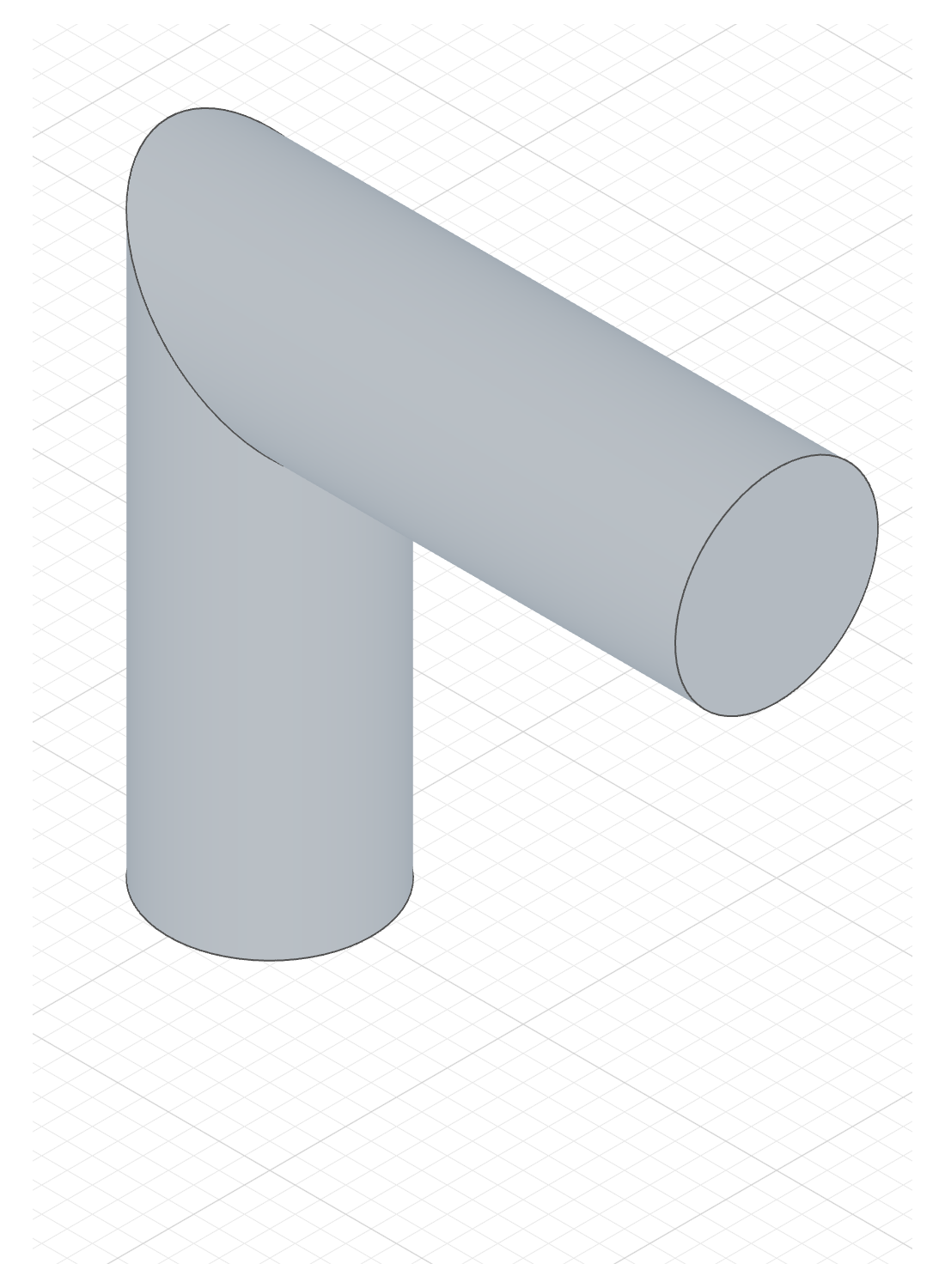
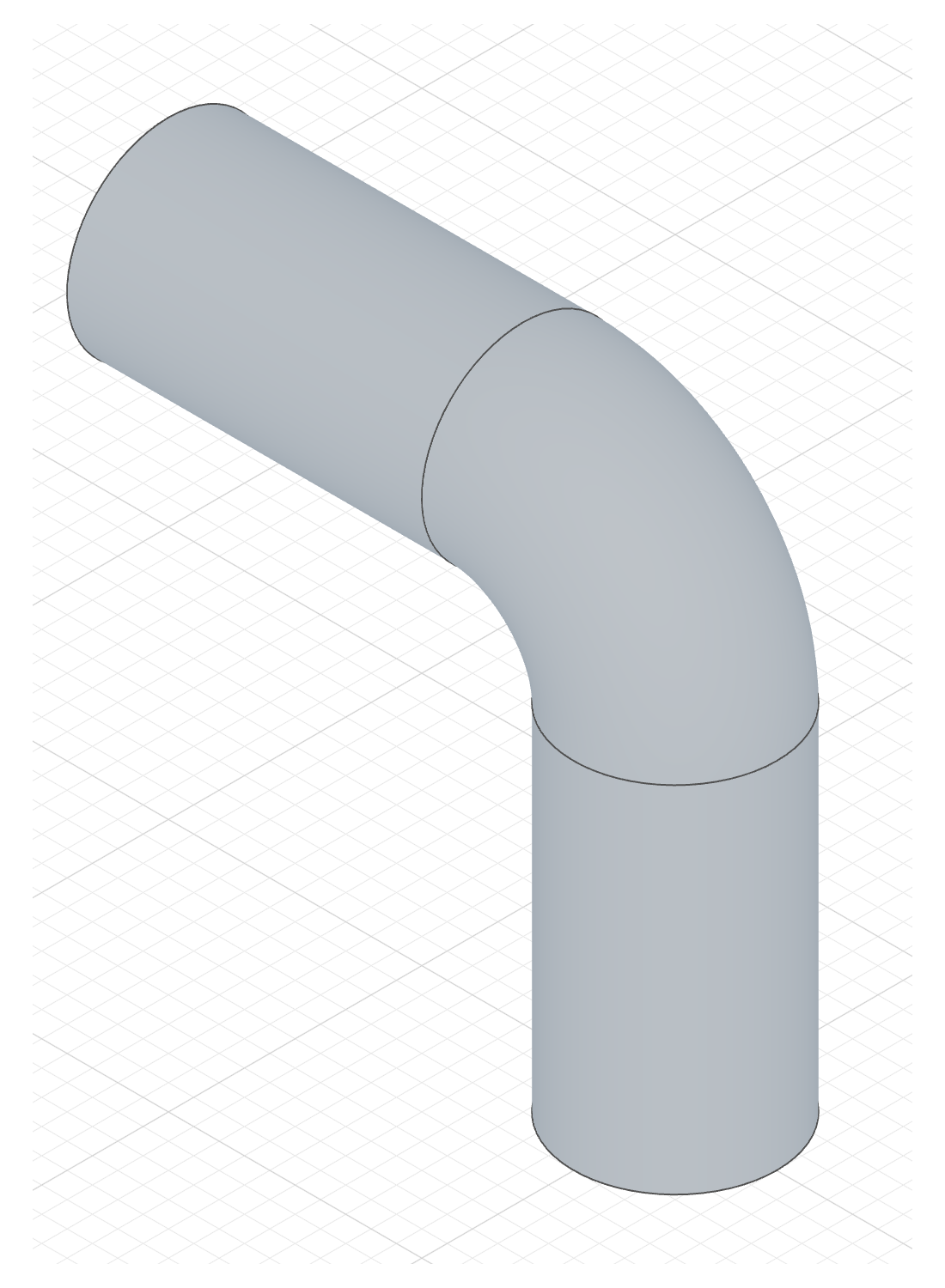
Where the path turns, the two legs are joined at the corner:
// @screenshot view iso-ftr extent 1100x1500
import { sketch, sweep } from 'fluidcad/core';
import { circle, line } from 'fluidcad/core';
import { coincident, vertical, horizontal, fix } from 'fluidcad/constraints';

const profile = sketch("top", () => {
    circle([0, 0], 40);
  })

const spine = sketch("front", () => {
    const up = line([0, 0], [0, 100]);
    const across = line([0, 100], [100, 100]);
    coincident(up.end(), across.start());
    vertical(up);
    horizontal(across);
    fix(up.start());
  })

sweep(spine, profile)
Two lines meet in a mitre: each leg is cut on the plane that bisects the corner, like two pipe lengths at an elbow.
// @screenshot view iso-ftr extent 1100x1500
import { sketch, sweep } from 'fluidcad/core';
import { circle, line, arc } from 'fluidcad/core';
import { coincident, vertical, horizontal, tangent, radius, fix } from 'fluidcad/constraints';

const profile = sketch("top", () => {
    circle([0, 0], 40);
  })

const spine = sketch("front", () => {
    const up = line([0, 0], [0, 70]);
    const bend = arc([0, 70], [-30, 100], [-30, 70]);
    const across = line([-30, 100], [-100, 100]);
    coincident(up.end(), bend.start());
    coincident(bend.end(), across.start());
    vertical(up);
    horizontal(across);
    tangent(up, bend);
    tangent(bend, across);
    radius(bend, 30);
    fix(up.start());
  })

sweep(spine, profile)
An arc tangent to both lines: the profile follows the bend and there is no joint at all.
A line meeting an arc without tangency is joined by spinning the profile about the corner. A leg shorter than the mitre at its end, or a path that folds straight back on itself, is an error rather than a self-intersecting solid.
Add, New and Remove
The pictures use a drawer front and a Ø16 circle swept along an arch drawn on its front face. The circle is centred on the face, so the tube runs half in, half out of the panel. Only the tab changes:

sweep(path, profile)The tube fuses with the panel — a rounded pull rail.

sweep(path, profile).new()The tube is a separate solid — a rail seated in the panel.

sweep(path, profile).remove()The tube's volume is cut out — a rounded finger-pull channel.
The Add column's code
The profile sits on plane(path, 'start'): a plane at the start of the path, normal to it, so the circle is swept square to the curve. The New and Remove columns only change the highlighted line.
import { sketch, extrude, sweep, plane, circle, line, arc } from 'fluidcad/core';
import { coincident, distance, fix, horizontal, vertical } from "fluidcad/constraints";

// The base part every column shares: a 120 x 60 drawer front, 15 thick,
// standing on the front plane.
sketch("xz", () => {
    const sg1 = line([-60, 0], [60, 0]);
    const sg2 = line([60, 0], [60, 60]);
    const sg3 = line([60, 60], [-60, 60]);
    const sg4 = line([-60, 60], [-60, 0]);
    coincident(sg1.end(), sg2.start());
    coincident(sg2.end(), sg3.start());
    coincident(sg3.end(), sg4.start());
    coincident(sg4.end(), sg1.start());
    horizontal(sg1);
    vertical(sg2);
    horizontal(sg3);
    vertical(sg4);
    fix(sg1.start(), [-60, 0]);
    distance(sg1.start(), sg1.end(), 120);
    distance(sg2.start(), sg2.end(), 60);
  })
const front = extrude(15)

// The path: a shallow arch drawn on the panel's front face, 80 wide.
const path = sketch(front.endFaces(), () => {
    const a = arc([-40, 20], [40, 20], [0, -40]).cw();
    fix(a.start(), [-40, 20]);
    fix(a.end(), [40, 20]);
  })

// The profile: a Ø16 circle at the path's start, on a plane normal to the
// path there. Its centre sits on the panel face, so the tube runs half in,
// half out of the panel.
const profile = sketch(plane(path, 'start'), () => {
    circle([0, 0], 16);
  })

// Add tab: the tube fuses with the panel — a rounded pull rail.
sweep(path, profile)
Thin walls
Turn on Thin for a pipe instead of a rod: the profile's edges are offset by the thickness and the band between them is swept.

The code behind it
import { sketch, sweep } from 'fluidcad/core';
import { circle, line, arc } from 'fluidcad/core';
import { coincident, vertical, tangent, radius, fix } from 'fluidcad/constraints';

const profile = sketch("top", () => {
    circle([0, 0], 40);
  })

const spine = sketch("front", () => {
    const l = line([0, 0], [0, 100]);
    const a1 = arc([0, 100], [-100, 100], [-50, 100]);
    const a2 = arc([-100, 100], [-180, 180], [-180, 100]).cw();
    coincident(l.end(), a1.start());
    coincident(a1.end(), a2.start());
    vertical(l);
    tangent(l, a1);
    tangent(a1, a2);
    fix(l.start());
    radius(a1, 50);
    radius(a2, 80);
  })

sweep(spine, profile).thin(5)
sweep(spine, profile).thin(5)     // 5 units outward
sweep(spine, profile).thin(-5)    // 5 units inward
sweep(spine, profile).thin(5, -3) // dual offset
Thin in the three modes
The same rail with Thin on and a wall of 2:

sweep(path, profile).thin(2)A 2-thick tube wall fused with the panel.

sweep(path, profile).thin(2).new()The tube wall as a separate body.

sweep(path, profile).thin(2).remove()Only the wall is cut — two curved slots; the core between them stays.
The Add column's code
import { sketch, extrude, sweep, plane, circle, line, arc } from 'fluidcad/core';
import { coincident, distance, fix, horizontal, vertical } from "fluidcad/constraints";

// The base part every column shares: a 120 x 60 drawer front, 15 thick,
// standing on the front plane.
sketch("xz", () => {
    const sg1 = line([-60, 0], [60, 0]);
    const sg2 = line([60, 0], [60, 60]);
    const sg3 = line([60, 60], [-60, 60]);
    const sg4 = line([-60, 60], [-60, 0]);
    coincident(sg1.end(), sg2.start());
    coincident(sg2.end(), sg3.start());
    coincident(sg3.end(), sg4.start());
    coincident(sg4.end(), sg1.start());
    horizontal(sg1);
    vertical(sg2);
    horizontal(sg3);
    vertical(sg4);
    fix(sg1.start(), [-60, 0]);
    distance(sg1.start(), sg1.end(), 120);
    distance(sg2.start(), sg2.end(), 60);
  })
const front = extrude(15)

// The path: a shallow arch drawn on the panel's front face, 80 wide.
const path = sketch(front.endFaces(), () => {
    const a = arc([-40, 20], [40, 20], [0, -40]).cw();
    fix(a.start(), [-40, 20]);
    fix(a.end(), [40, 20]);
  })

// The profile: a Ø16 circle at the path's start, on a plane normal to the
// path there. Its centre sits on the panel face, so the tube runs half in,
// half out of the panel.
const profile = sketch(plane(path, 'start'), () => {
    circle([0, 0], 16);
  })

// Add + Thin: a 2-thick tube wall instead of a solid rod, fused with the panel.
sweep(path, profile).thin(2)
Open profiles
Thin sweep also works with open profiles. The ends are capped — select them with capFaces() / capEdges():

The code behind it
import { sketch, sweep } from 'fluidcad/core';
import { line, arc } from 'fluidcad/core';
import { coincident, vertical, tangent, radius, fix } from 'fluidcad/constraints';

const profile = sketch("top", () => {
    line([-30, 0], [30, 0])
  })

const spine = sketch("front", () => {
    const l = line([0, 0], [0, 100]);
    const a1 = arc([0, 100], [-100, 100], [-50, 100]);
    coincident(l.end(), a1.start());
    vertical(l);
    tangent(l, a1);
    fix(l.start());
    radius(a1, 50);
  })

sweep(spine, profile).thin(5).new()
Accessing geometry
const s = sweep(spine, profile)

s.endFaces()       // face at the end of the path
s.startFaces()     // face at the start of the path
s.sideFaces()      // the swept surface(s)
s.endEdges()       // edges at the end
s.startEdges()     // edges at the start
s.sideEdges()      // edges along the sides
s.internalFaces()  // internal faces (if profile has holes)
s.internalEdges()  // internal edges
s.capFaces()       // cap face(s) of a thin sweep (open profile)
s.capEdges()       // cap edges of a thin sweep (open profile)
Fusion scope
sweep(spine, profile).new()                // create a separate solid
sweep(spine, profile).add()                // fuse with touching solids (default)
sweep(spine, profile).remove()             // subtract from all intersecting solids
sweep(spine, profile).remove().scope(box)  // subtract only from the box